DBMS Architecture Explained
Many students confuse DBMS architecture with database models like relational or NoSQL. But the real question is not just how data is stored, it is how users and applications interact with the database.
In real-world systems, the way a client connects to a database affects security, scalability, and performance. This structural design is known as database architecture in DBMS.
In this guide, you will understand the types of database management system architectures, how each model works, the working flow, the comparison between tiers, and real-world use cases.
What is DBMS Architecture?
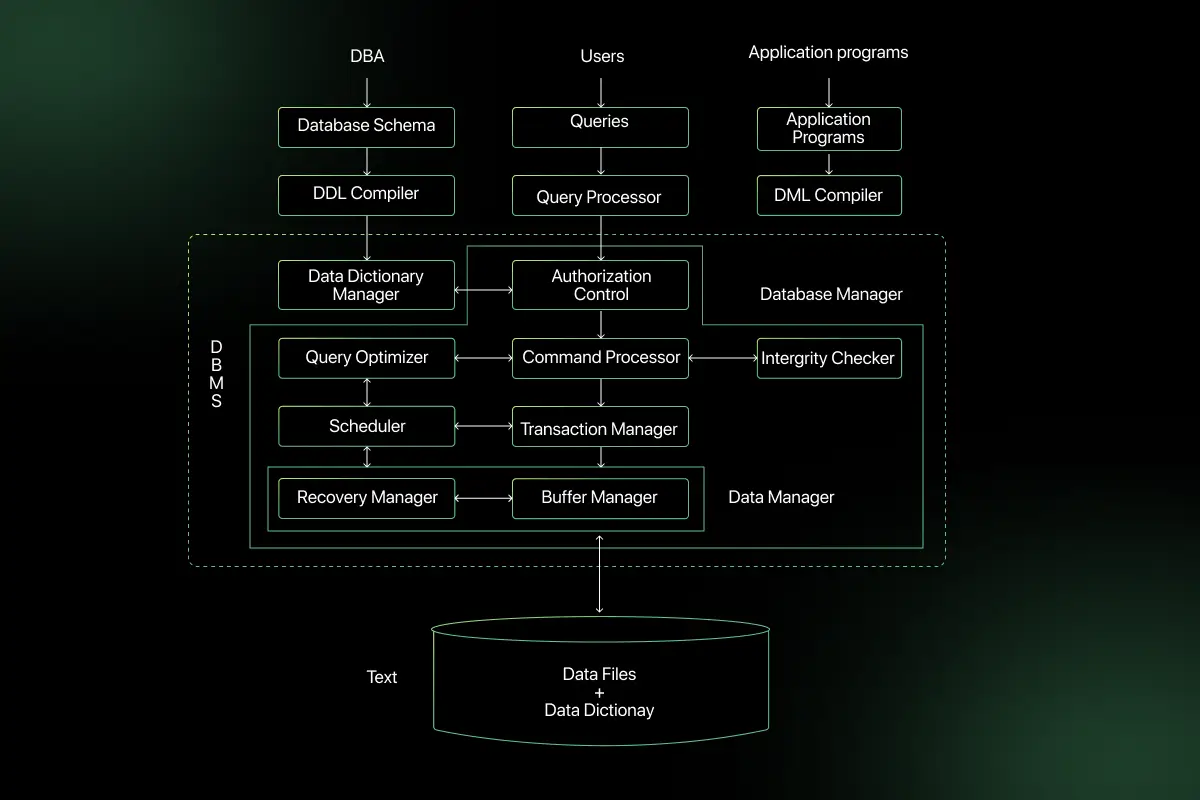
DBMS architecture defines how the database system is structured and how users and applications interact with the database. It describes the overall design of a database system and the relationship between different components.
In simple terms, database system architecture explains how requests move from the user to the database and how responses are returned.
Functions:
- It defines the layers between the user interface and the database.
- It controls how data is accessed, secured, and processed.
- It ensures better scalability, performance, and centralized management.
Example:
Consider a college portal where students log in to check their marks.
The student interacts with the website, the website communicates with the application logic, and the application fetches data from the database. This structured interaction is defined by the database architecture in DBMS.
Why Do We Need DBMS Architecture?
In real applications, allowing users to directly access the database is risky and difficult to manage.
Large systems require separation between the user interface, application logic, and data storage to handle multiple users securely and efficiently.
Key Reasons:
- Data security – Restricts direct access and protects sensitive information.
- Scalability – Supports growing users and increasing data without performance issues.
- Centralized control – Manages permissions, updates, and monitoring from one place.
- Better performance management – Optimizes queries and reduces system load.
Types of DBMS Architecture
1-Tier Architecture
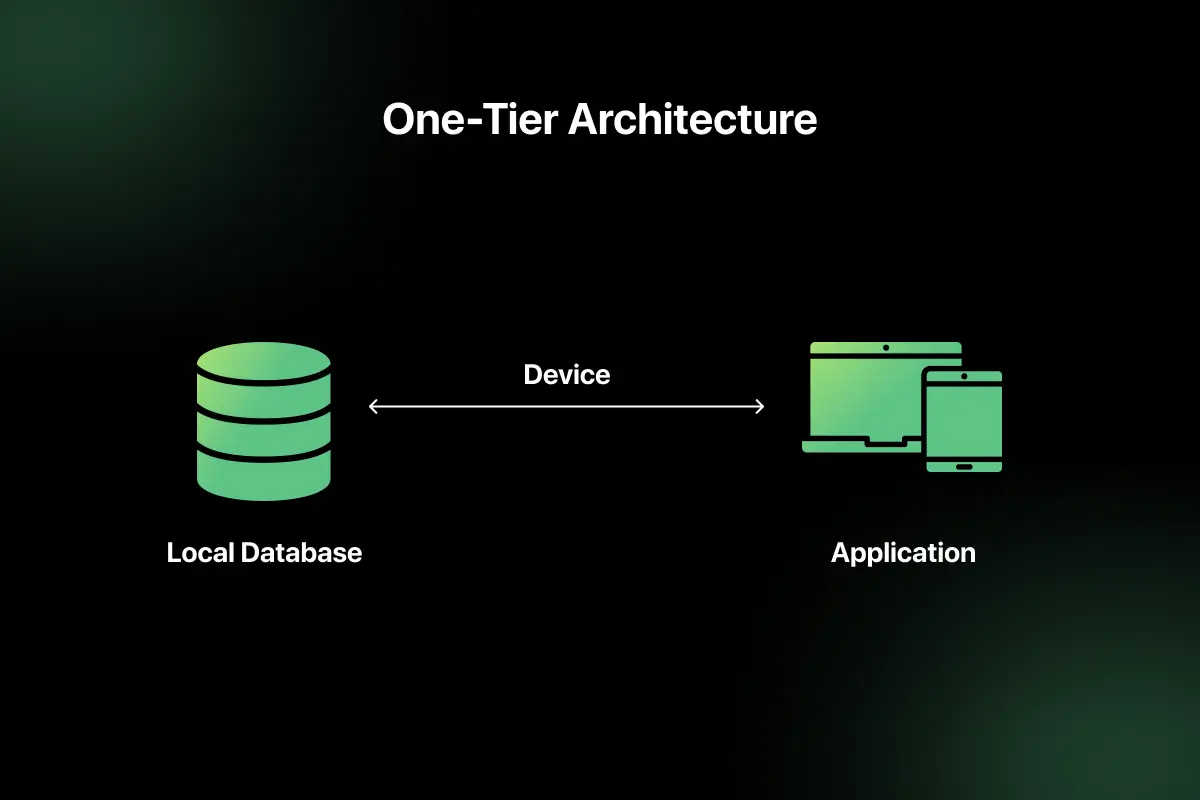
In 1 tier architecture, the user interface, application logic, and database all exist on the same system. There is no separate server involved.
This architecture is mainly used for local development and testing purposes. Since everything runs on a single machine, it is simple to set up and manage.
There is no network communication between layers because the user directly interacts with the database through the same system.
Example: A desktop application like MS Access running on a single computer, where the user creates, stores, and retrieves data locally.
Advantages
- Simple to design and implement
- No network dependency
- Fast for small-scale local tasks
- Easy maintenance for single-user systems
Limitations
- Not suitable for multi-user environments
- Limited scalability
- Weak security since the data is directly accessible
- Not practical for large or distributed systems
2-Tier Architecture
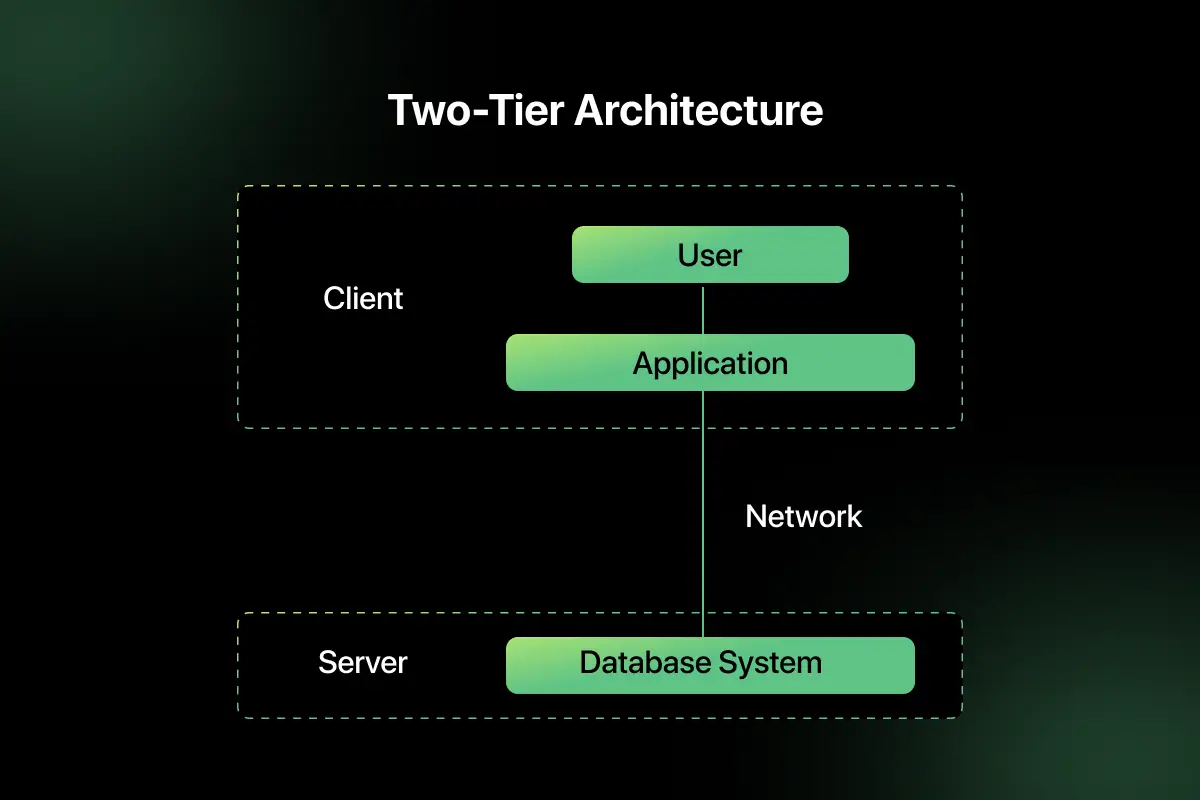
In 2 tier architecture, the client application communicates directly with the database server. The business logic may reside either on the client side or partially on the server.
In this model, the client sends requests to the database server, and the server processes queries and returns results. Communication happens over a network, making it suitable for small to medium-sized applications.
This architecture is commonly used in small business systems where a limited number of users access a centralized database.
Example: A desktop application installed on multiple computers in an office that connects directly to a MySQL server to store and retrieve data.
Advantages
- Better data security compared to 1 tier architecture
- Supports multiple users
- Centralized data storage
- Faster response for small to medium applications
Limitations
- Limited scalability for large systems
- Client machines may handle heavy processing
- Difficult to maintain when user base grows
- Direct database exposure increases risk compared to layered models
3-Tier Architecture
In 3 tier architecture, an application layer sits between the client and the database. This layer handles business logic and controls communication between the user interface and the database.
Explanation of Layers
- Presentation Layer: This is the user interface where users interact with the system. It can be a website, mobile app, or desktop interface.
- Application Layer: This layer processes user requests, applies business rules, validates input, and sends queries to the database. It acts as a bridge between the user and the database.
- Database Layer: This layer stores, manages, and retrieves data. It executes queries sent by the application layer and returns results.
Example
A banking website where users log in to check their account balance. The website interface sends the request to the application server, which validates the user and retrieves data from the database.
An e-commerce platform where users browse products, place orders, and process payments through a structured, layered system.
This layered database architecture improves security, scalability, and maintainability compared to 1-tier and 2-tier models.
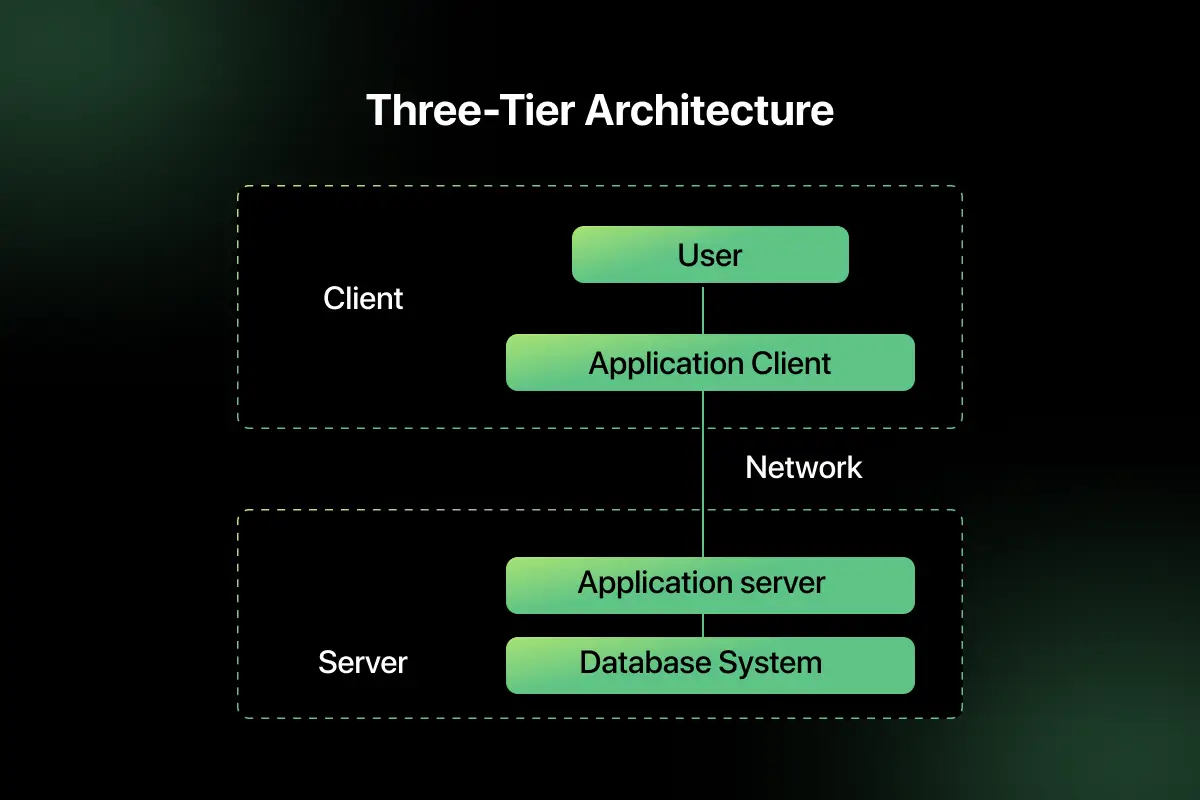
Working Flow of 3-Tier Architecture (Step-by-Step)
To understand how DBMS architecture works in real applications, let us take a simple example of a student logging into a college portal.
Scenario: A student wants to check exam results through the college website.
Step-by-Step Flow
- User enters credentials: The student enters username and password in the login page, which belongs to the presentation layer.
- Request goes to application server: The login request is sent to the application layer through the network.
- Application validates the request: The application server checks the input format and applies business rules. It prepares a query to verify the credentials.
- Query sent to database: The application layer sends a structured query to the database layer to check whether the user details match stored records.
- Database processes and returns a response: The database executes the query and sends the result back to the application layer.
- Response returned to user: The application formats the result and sends it to the presentation layer, where the student can view the dashboard or an error message.
This step-by-step interaction clearly explains how the architecture of DBMS ensures controlled access, better security, and proper separation between user interface, business logic, and data storage.
Comparison Table: 1-Tier vs 2-Tier vs 3-Tier
Understanding the difference between each database architecture model helps in choosing the right structure for an application.
The table below compares 1-tier, 2-tier, and 3-tier database system architectures based on key factors.
| Factor | 1 Tier Architecture | 2 Tier Architecture | 3 Tier Architecture |
| Layers | Single layer where user, application, and database exist on the same system | Two layers: client application and database server | Three layers: presentation layer, application layer, and database layer |
| Scalability | Very limited, suitable for single-user systems | Moderate scalability for small to medium applications | High scalability, supports large and distributed systems |
| Security | Low security since the database is directly accessible | Better than 1 tier, but the database is still directly exposed to the client | High security due to the separation between the user interface and the database |
| Performance | Fast for small local tasks | Good for a small user base, but it can slow down with a heavy load | Optimized performance with proper load handling and processing distribution |
| Use Case | Local development and testing | Small business applications | Banking systems, e-commerce platforms, enterprise systems |
| Complexity | Very simple to design and manage | Moderate complexity | Higher complexity due to multiple layers and server configuration |
Real-World Use Cases
Learning the different types of DBMS architecture involves understanding how database layers interact in real systems.
Different applications use different types of database architecture based on their scale, security needs, and number of users.
Below are common real-world systems and the tier architecture they typically use.
College ERP Systems
Most college ERP portals use 3 tier architecture. Students and staff access the presentation layer through a web interface, the application layer processes attendance, marks, and fee data, and the database layer stores records securely.
Banking Systems
Banking applications use 3 tier or even multi-layer architecture. Strong separation between user interface, application logic, and database ensures high security, transaction control, and regulatory compliance.
E-Commerce Websites
E-commerce platforms follow 3 tier architecture to manage product listings, orders, payments, and user accounts. The application layer handles business logic while the database layer stores customer and transaction data.
ATM Networks
ATM systems use a structured database system architecture where the ATM interface acts as the presentation layer, banking servers act as the application layer, and centralized databases store account information. This separation ensures secure and reliable transactions.
These examples show that large-scale and multi-user systems prefer layered database architecture for better scalability, security, and performance.
DBMS Architecture vs Database Schema (Common Confusion)
Many students confuse DBMS architecture with database schema concepts. However, these two are completely different.
DBMS architecture defines how different components, such as the user interface, application logic, and database, interact with each other. It focuses on the structural design of the database system.
A database schema, on the other hand, defines how data is organized inside the database. It focuses on the structure of tables, relationships, and data definitions.
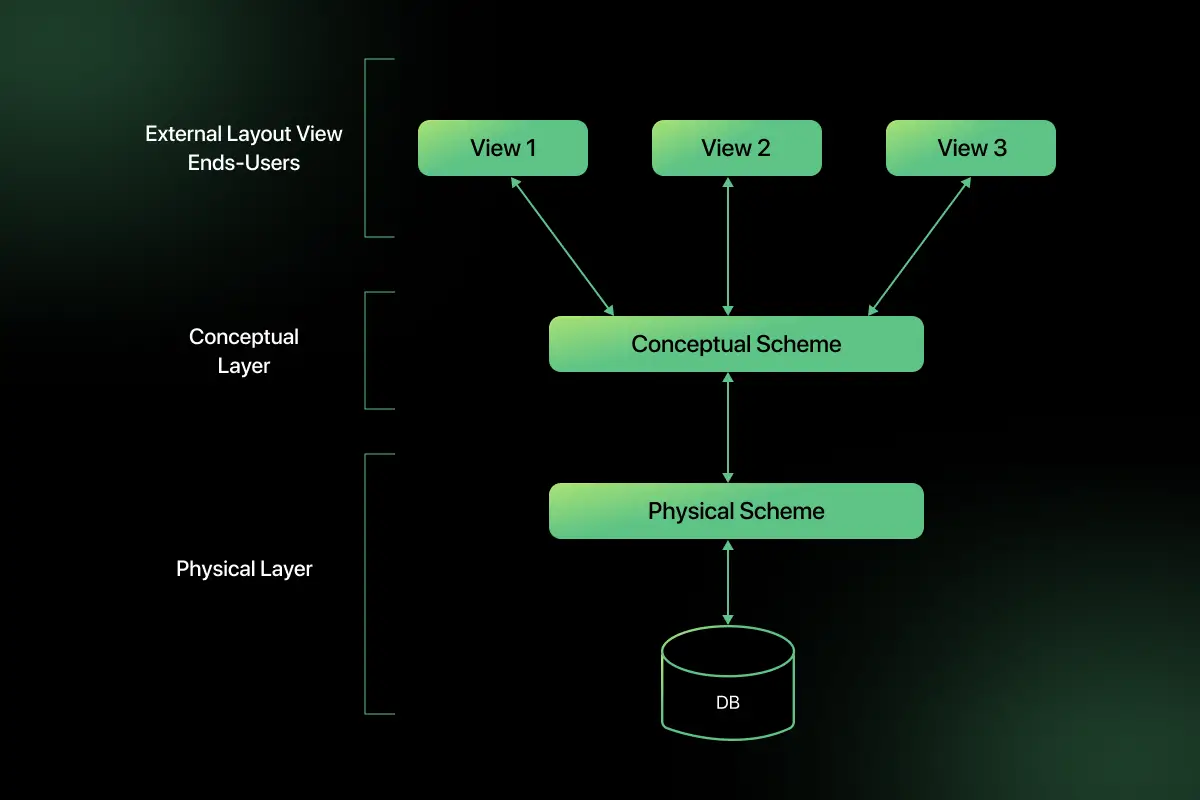
Types of Database Schema
- Physical Schema: Defines how data is physically stored in storage devices. It includes file structure, indexes, and storage allocation details.
- Logical Schema: Defines the overall logical structure of the database. It includes tables, attributes, data types, and relationships between entities.
- View Schema: Defines how users view the data. It shows only relevant portions of the database based on user roles and access permissions.
Important Concepts to Remember
- Difference between 2-tier and 3-tier architecture
- Security comparison of different DBMS architecture models
- Use cases of 1 tier architecture
- Role of the application layer in 3 tier architecture
- Scalability differences across tier models
- Real-world scenario selection of appropriate architecture
If you want to test your understanding of database architecture concepts, try solving DBMS MCQ questions that cover tier models, database layers, and system design basics.
These DBMS interview questions for practice help reinforce concepts commonly asked in technical tests and placement exams.
Final Words
DBMS architecture defines how users, applications, and databases interact within a structured system. It ensures proper separation of layers to improve security, scalability, and performance.
Choosing the right tier architecture depends on the size, complexity, and requirements of the application.
Explore More Architecture Blogs
- Microservices
- Web Application
- REST API and API Gateway
- Distributed Systems
- OSI Security Model
- Cloud Computing
- Docker
- Kubernetes
- SAP
- SQL Server
- Spring Boot
- Data Warehouse
- Java
- Linux
- Angular
- Selenium
FAQs
DBMS architecture defines how users, applications, and the database interact within a database system. It explains the structural design that controls data access, processing, and communication between layers.
In 2 tier architecture, the client directly communicates with the database server. In 3 tier architecture, an application layer sits between the client and the database, improving security and scalability.
3 tier architecture is more secure because the database is not directly exposed to users. The application layer validates requests and controls access before communicating with the database.
1-tier architecture is mainly used in local systems, small desktop applications, and development environments where the user and database exist on the same machine.
Yes, most web applications use 3 tier architecture. The browser acts as the presentation layer, the server handles business logic, and the database stores data securely.
The application server processes user requests, applies business logic, validates input, and communicates with the database. It acts as an intermediate layer between the user interface and data storage.
Yes, understanding DBMS architecture is important for interviews and system design discussions because it demonstrates knowledge of scalability, security, and structured database interaction.



Aarthy is a passionate technical writer with diverse experience in web development, Web 3.0, AI, ML, and technical documentation. She has won over six national-level hackathons and blogathons. Additionally, she mentors students across communities, simplifying complex tech concepts for learners.



Aarthy is a passionate technical writer with diverse experience in web development, Web 3.0, AI, ML, and technical documentation. She has won over six national-level hackathons and blogathons. Additionally, she mentors students across communities, simplifying complex tech concepts for learners.
Related Posts
Difference between Main memory and Secondary memory
Have you ever noticed that unsaved work disappears after a power failure, while your documents, photos, and applications remain available …
Warning: Undefined variable $post_id in /var/www/wordpress/wp-content/themes/placementpreparation/template-parts/popup-zenlite.php on line 1050
so far feels like...
