REST API Interview Questions and Answers
Are you preparing for a technical interview and wondering what kind of REST API questions you might face?
REST APIs are a core part of modern web development, and interviewers often test your understanding of HTTP concepts, API design, authentication, and real-world implementation.
This guide on REST API Interview Questions and Answers provides structured, interview-focused questions, categorized by difficulty level, to help you revise concepts and clearly and confidently handle REST-related interview rounds.
REST API Interview Questions for Freshers
1. What is a REST API?
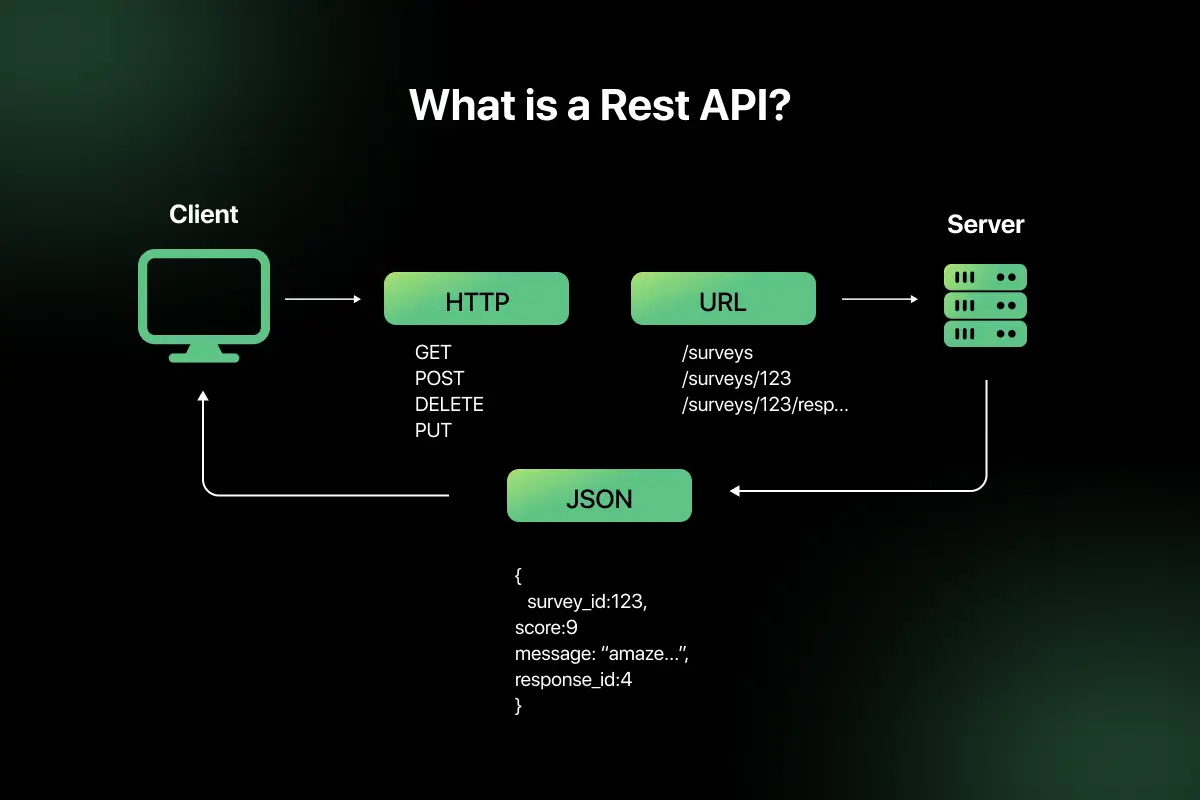
A REST API (Representational State Transfer Application Programming Interface) is a web service that allows clients to communicate with servers using standard HTTP methods. It follows REST architectural principles to access and manipulate resources over the internet.
REST APIs are:
- Stateless
- Resource-based
- Client-server structured
- Cacheable
- Based on standard HTTP protocols
Example: GET /users/101 retrieves details of a specific user.
2. What does REST stand for, and what are its architectural constraints?
REST stands for Representational State Transfer. It is an architectural style for designing networked applications.
REST follows six key constraints:
- Client-Server – Separation of frontend and backend.
- Stateless – Each request contains all required information.
- Cacheable – Responses should define cacheability.
- Uniform Interface – Standardized communication format.
- Layered System – Client does not know whether it connects directly to server.
- Code on Demand (optional) – Server can send executable code.
These constraints ensure scalability, simplicity, and performance.
3. What is the difference between REST and SOAP?
| Feature | REST | SOAP |
| Type | Architectural style | Protocol |
| Data Format | JSON, XML, others | XML only |
| Performance | Lightweight and faster | Heavier due to XML |
| Transport | Mostly HTTP | HTTP, SMTP, etc. |
| Flexibility | High | Strict standards |
| Use Case | Web and mobile apps | Enterprise systems |
REST is simpler and widely used for web APIs, while SOAP is more rigid and often used in enterprise-level applications.
4. Explain the difference between HTTP and HTTPS.
| Feature | HTTP | HTTPS |
| Security | Not secure | Secure |
| Encryption | No encryption | Uses SSL/TLS encryption |
| Port | 80 | 443 |
| Data Protection | Vulnerable to interception | Encrypted communication |
| Use Case | Public content | Secure transactions |
HTTPS adds encryption over HTTP, ensuring secure communication between client and server.
5. What are HTTP methods? Explain GET, POST, PUT, DELETE.
HTTP methods define the type of operation to be performed on a resource.
- GET – Retrieve data from server (Read operation).
- POST – Create a new resource.
- PUT – Update an existing resource completely.
- DELETE – Remove a resource.
Example:
- GET /users – Fetch all users.
- POST /users – Create a new user.
- PUT /users/101 – Update user 101.
- DELETE /users/101 – Delete user 101.
Each method represents a specific CRUD operation.
6. What is the difference between PUT and PATCH?
| Feature | PUT | PATCH |
| Update Type | Full update | Partial update |
| Idempotent | Yes | Yes (usually) |
| Payload | Entire resource | Only changed fields |
| Example | Replace full user record | Update only email field |
PUT replaces the entire resource, while PATCH updates only specific fields.
7. What is a resource in REST API?
A resource is any entity that can be accessed via a URI in a REST API.
Examples:
/users
/orders/500
/products/10
Resources are represented using formats such as JSON and are manipulated using HTTP methods.

8. What is meant by statelessness in REST?
Statelessness means that each request from the client to the server must contain all information needed to process the request.
The server does not store session information between requests. Every request is independent.
Benefits:
- Improved scalability
- Easier load balancing
- Reduced server complexity
Example: Authentication tokens are sent with every request instead of maintaining server-side sessions.
9. What are HTTP status codes? Explain 200, 201, 400, 401, 404, 500.
HTTP status codes indicate the result of a client request.
- 200 OK – Request successful.
- 201 Created – Resource successfully created.
- 400 Bad Request – Invalid request format.
- 401 Unauthorized – Authentication required or failed.
- 404 Not Found – Resource does not exist.
- 500 Internal Server Error – Server-side failure.
Status codes help clients understand whether a request succeeded or failed.
10. What is the difference between 401 and 403 status codes?
| Feature | 401 Unauthorized | 403 Forbidden |
| Meaning | Authentication required or failed | Access denied despite authentication |
| Cause | Missing/invalid credentials | Insufficient permissions |
| Example | No token provided | User lacks admin rights |
401 indicates the client is not authenticated, while 403 means the client is authenticated but not authorized.
11. What are request headers and response headers?
Request and response headers are key-value pairs exchanged between client and server to provide additional information about the request or response.
Request headers contain metadata sent by the client, such as:
- Authorization – Authentication credentials
- Content-Type – Format of request body (e.g., application/json)
- Accept – Expected response format
- User-Agent – Client information
Response headers are sent by the server and may include:
- Content-Type – Format of response data
- Cache-Control – Caching instructions
- Set-Cookie – Session details
- Server – Server information
Headers help manage authentication, content negotiation, caching, and security.
12. What is JSON, and why is it commonly used in REST APIs?
JSON (JavaScript Object Notation) is a lightweight data format used to exchange data between client and server.
Example:
{
“id”: 101,
“name”: “Rahul”,
“email”: “[email protected]”
}
JSON is commonly used because:
- It is lightweight and human-readable.
- It is easy to parse in most programming languages.
- It reduces bandwidth compared to XML.
- It integrates well with web technologies and JavaScript.
Due to its simplicity and efficiency, JSON is the standard data format in modern REST APIs.
13. What is an endpoint in REST API?
An endpoint is a specific URL where a REST API can be accessed by a client.
It represents a resource or a collection of resources.
Example:
- /users – Access list of users
- /users/101 – Access specific user
Endpoints define how clients interact with server resources through HTTP methods.
14. What is the role of URL in RESTful services?
In RESTful services, URLs identify resources uniquely.
A well-designed URL:
- Represents nouns (resources), not verbs.
- Follows hierarchical structure.
- Uses path parameters for specific resources.
- Avoids unnecessary complexity.
Example:
- Correct: /orders/500
- Avoid: /getOrderDetails?id=500
URLs help maintain clean, predictable API design.
15. What is idempotency in REST APIs?
Idempotency means that making the same request multiple times produces the same result as making it once.
| Method | Idempotent |
| GET | Yes |
| PUT | Yes |
| DELETE | Yes |
| POST | No |
Example:
Sending PUT /users/101 multiple times with the same data will not create multiple resources. Idempotency helps ensure reliability in distributed systems.
16. What is the difference between query parameters and path parameters?
| Feature | Path Parameters | Query Parameters |
| Purpose | Identify specific resource | Filter or modify resource list |
| URL Position | Part of URL path | After ? symbol |
| Example | /users/101 | /users?role=admin |
| Required | Usually required | Usually optional |
Path parameters are used to identify a resource, while query parameters refine the request.
17. What is CORS, and why does it occur?
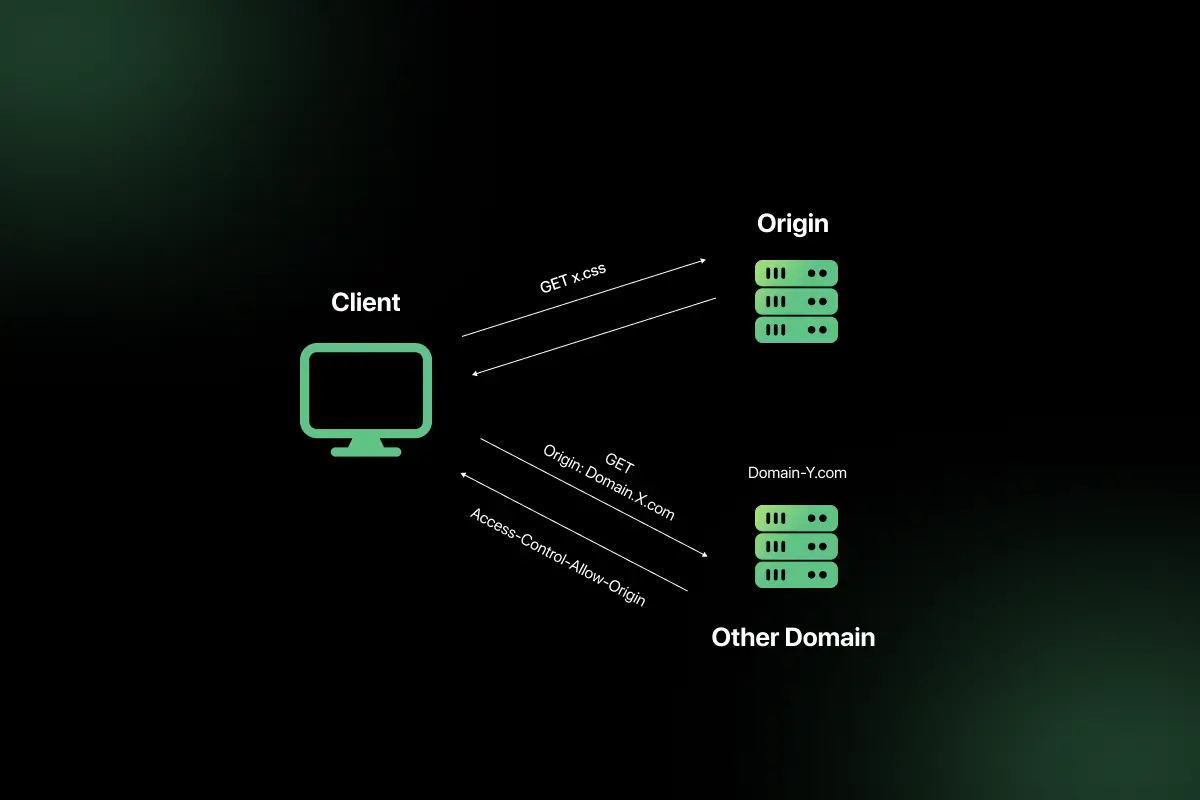
CORS (Cross-Origin Resource Sharing) is a security mechanism that restricts web pages from making requests to a different domain than the one that served the page.
It occurs because browsers enforce the Same-Origin Policy to prevent security risks.
Example:
If a frontend running on example.com calls an API on api.example.com, the browser may block it unless CORS headers allow it.
CORS is controlled using headers like:
- Access-Control-Allow-Origin
- Access-Control-Allow-Methods
18. How do you test a REST API?
REST APIs can be tested using:
- API testing tools (Postman, Insomnia)
- Command-line tools like curl
- Automated testing frameworks
- Unit and integration testing tools
Testing involves:
- Sending HTTP requests
- Verifying response body
- Checking status codes
- Validating headers
- Testing edge cases and error scenarios
Proper testing ensures reliability and correctness of API behavior.
19. What is Postman, and how is it used?
Postman is a popular API development and testing tool used to send HTTP requests and analyze responses.
It allows developers to:
- Send GET, POST, PUT, DELETE requests
- Add headers and authentication tokens
- Test request payloads
- Automate API tests
- Save collections of requests
Postman simplifies API testing without writing code.
20. What is API documentation, and why is it important?
API documentation describes how an API works, including endpoints, request formats, response formats, authentication methods, and examples.
It is important because:
- Helps developers understand how to use the API.
- Reduces integration errors.
- Improves collaboration between frontend and backend teams.
- Speeds up onboarding and development.
Tools like Swagger and OpenAPI help generate standardized API documentation.
REST API Interview Questions for Intermediat
1. Explain REST architectural constraints in detail.
REST is based on architectural constraints that ensure scalability, simplicity, and performance.
- Client–Server – Separation of concerns between frontend and backend. The client handles UI, while the server manages data and logic.
- Stateless – Each request must contain all required information. The server does not store session state.
- Cacheable – Responses must define whether they can be cached to improve performance.
- Uniform Interface – Standardized way of interacting with resources using HTTP methods.
- Layered System – Clients cannot tell whether they are connected directly to the server or an intermediary.
- Code on Demand (optional) – Server can send executable code (e.g., JavaScript).
These constraints make REST APIs scalable, loosely coupled, and easy to evolve.
2. How do you design a RESTful URL structure?
A well-designed RESTful URL:
- Uses nouns instead of verbs.
- Represents resources clearly.
- Uses plural names for collections.
- Uses hierarchical structure.
- Avoids unnecessary parameters in path.
Examples:
/users – Get all users
/users/101 – Get user with ID 101
/users/101/orders – Get orders of user 101
Avoid:
/getUsers
/createOrder
Clean URLs improve readability, maintainability, and consistency.
3. What are best practices for naming REST endpoints?
Best practices include:
- Use lowercase letters.
- Use hyphens instead of underscores.
- Avoid verbs in URLs.
- Keep URLs consistent and predictable.
- Use plural resource names.
- Use path parameters for resource identification.
- Use query parameters for filtering.
Good example:
/products/50/reviews
Poor example:
/getProductReviewsById
Consistency is critical for API usability.
4. How do you implement authentication in REST APIs?
Authentication verifies the identity of a user.
Common implementation methods:
- Basic Authentication – Username and password encoded in headers.
- Token-based Authentication – User logs in and receives a token.
- JWT Authentication – Token contains user claims.
- OAuth 2.0 – Delegated authorization protocol.
Typical flow:
- Client sends login credentials.
- Server validates credentials.
- Server generates token.
- Client includes token in Authorization header for future requests.
Example header:
Authorization: Bearer eyJhbGciOiJIUzI1NiIsInR5cCI6IkpXVCJ9…
5. What is JWT, and how does it work?
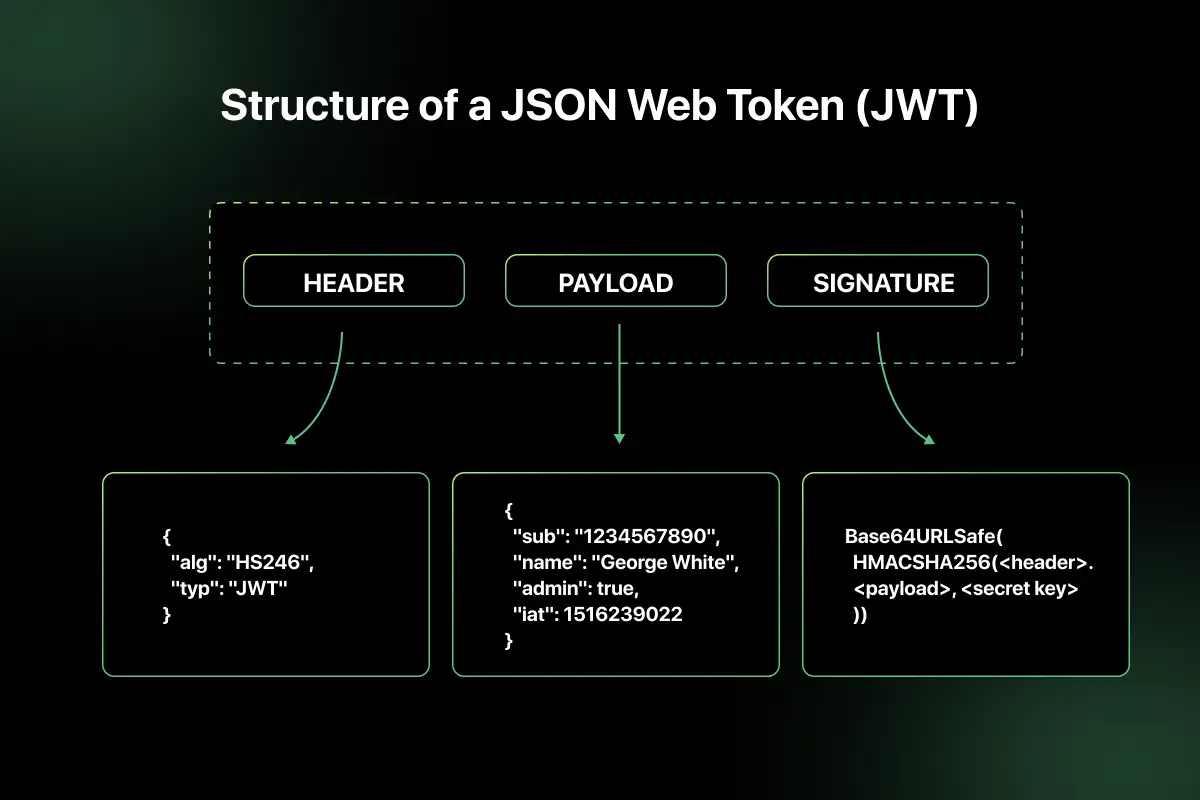
JWT (JSON Web Token) is a compact, self-contained token used for secure data transmission between parties.
A JWT consists of three parts:
- Header
- Payload
- Signature
Format:
Header.Payload.Signature
How it works:
- User logs in successfully.
- Server generates JWT with user details.
- Client stores token.
- Client sends token with each request.
- Server validates signature before processing request.
JWT enables stateless authentication and reduces server-side session storage.
6. What is OAuth 2.0, and where is it used?
OAuth 2.0 is an authorization framework that allows third-party applications to access user data without exposing credentials.
Commonly used in:
- Social logins (Google, Facebook login)
- API access for third-party apps
- Enterprise identity management systems
OAuth flow involves:
- Resource owner
- Client application
- Authorization server
- Resource server
It uses access tokens to grant limited access to resources securely.
7. What is the difference between authentication and authorization?
| Feature | Authentication | Authorization |
| Purpose | Verify identity | Grant access rights |
| Question | Who are you? | What can you do? |
| Example | Login with username/password | Access admin dashboard |
| Happens First | Yes | After authentication |
Authentication confirms identity, while authorization determines permissions.
8. How do you handle error responses in REST APIs?
Error handling should be consistent and meaningful.
Best practices:
- Use appropriate HTTP status codes.
- Provide descriptive error messages.
- Include error codes for tracking.
- Avoid exposing sensitive system details.
- Maintain consistent response structure.
Example error response:
{
“timestamp”: “2026-02-20T10:00:00Z”,
“status”: 400,
“error”: “Invalid request”,
“message”: “Email field is required”
}
Proper error handling improves debugging and client integration.
9. What is API versioning, and why is it necessary?
API versioning allows changes to APIs without breaking existing clients.
It is necessary because:
- APIs evolve over time.
- New features may require structural changes.
- Backward compatibility must be maintained.
Example:
/api/v1/users
/api/v2/users
Versioning ensures older applications continue functioning while newer versions introduce improvements.
10. Compare URL versioning and header versioning.
| Feature | URL Versioning | Header Versioning |
| Location | Included in URL | Included in request header |
| Example | /api/v1/users | Accept: application/vnd.company.v1+json |
| Visibility | Visible in URL | Hidden in headers |
| Simplicity | Easy to implement | Cleaner URLs |
| Adoption | Widely used | Used in advanced APIs |
URL versioning is simpler and commonly used, while header versioning keeps URLs clean but requires more configuration.
11. What is rate limiting, and how is it implemented?
Rate limiting restricts the number of API requests a client can make within a specific time period. It protects APIs from abuse, brute-force attacks, and excessive traffic.
Common implementation techniques:
- Fixed Window Counter – Limit requests per fixed time window.
- Sliding Window – More accurate tracking across time intervals.
- Token Bucket Algorithm – Allows burst traffic within limits.
- Leaky Bucket Algorithm – Processes requests at a constant rate.
Example: Allow 100 requests per minute per user. If exceeded, return HTTP 429 (Too Many Requests).
Rate limiting improves security, stability, and fair usage of APIs.
12. What is HATEOAS in REST?
HATEOAS (Hypermedia As The Engine Of Application State) is a REST constraint where responses include hyperlinks that guide clients on available next actions.
Example response:
{
“id”: 101,
“name”: “Rahul”,
“links”: {
“self”: “/users/101”,
“orders”: “/users/101/orders”
}
}
Benefits:
- Reduces hardcoded URLs in clients.
- Improves discoverability.
- Makes APIs more self-descriptive.
- HATEOAS enables dynamic interaction based on server-provided links.
13. How do you secure REST APIs?
Securing REST APIs involves multiple layers:
- Use HTTPS to encrypt communication.
- Implement strong authentication (JWT, OAuth 2.0).
- Enforce authorization using roles and permissions.
- Apply rate limiting and throttling.
- Validate and sanitize input data.
- Avoid exposing sensitive information in responses.
- Enable logging and monitoring.
- Implement CORS properly.
Security must be integrated at design, implementation, and infrastructure levels.
14. What is caching in REST APIs?
Caching stores API responses temporarily to reduce server load and improve response time.
REST supports caching through HTTP headers such as:
- Cache-Control
- Expires
- ETag
- Last-Modified
Benefits:
- Reduced server processing.
- Lower latency.
- Improved scalability.
- Better user experience.
Caching should be carefully configured to avoid serving stale data.
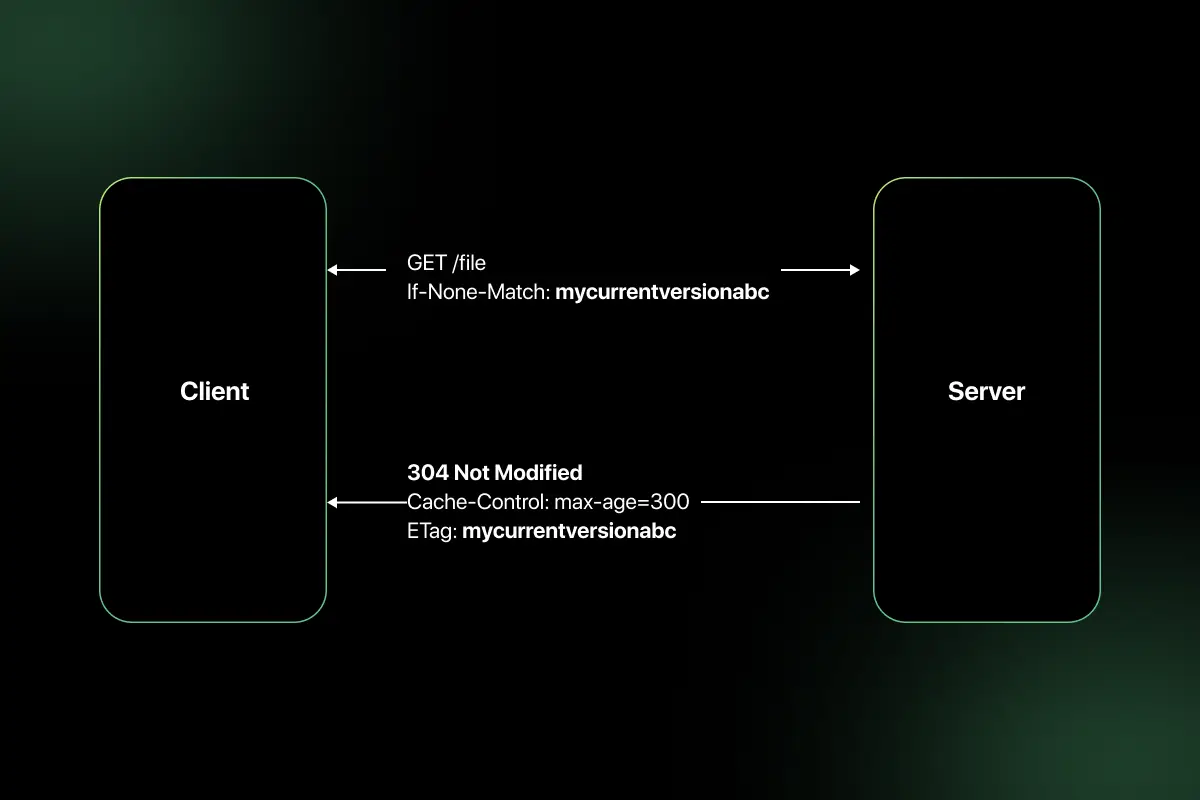
15. Explain ETag and its role in caching.
ETag (Entity Tag) is a unique identifier assigned to a specific version of a resource.
When a client requests a resource:
- Server sends ETag in response header.
- Client stores ETag.
- On next request, client sends If-None-Match header with stored ETag.
- If resource has not changed, server returns 304 (Not Modified).
Example header:
ETag: “abc123”
ETag reduces bandwidth usage and improves performance by preventing unnecessary data transfer.
16. How do you handle pagination in REST APIs?
Pagination limits the number of results returned in a single API response.
Common approaches:
- Offset-based pagination
Example: /users?page=2&limit=10 - Cursor-based pagination
Example: /users?cursor=abc123 - Page-based pagination
Example: /users?page=1
Best practices:
- Return total count.
- Include next and previous links.
- Avoid returning large datasets in one response.
Pagination improves performance and usability for large datasets.
17. What is content negotiation?
Content negotiation allows clients to specify the format of the response they prefer.
Clients use headers like:
Accept: application/json
Accept: application/xml
Server selects appropriate format based on request headers.
Benefits:
- Supports multiple response formats.
- Improves API flexibility.
- Enables backward compatibility.
Content negotiation improves interoperability across different clients.
18. Write a sample REST API request and response for creating a user.
Request:
POST /users
Content-Type: application/json
Request Body:
{
“name”: “Amit”,
“email”: “[email protected]”
}
Response:
Status: 201 Created
{
“id”: 102,
“name”: “Amit”,
“email”: “[email protected]”,
“createdAt”: “2026-02-20T10:00:00Z”
}
The server generates a new resource and returns the created entity with status code 201.
19. How do you validate input data in REST APIs?
Input validation ensures that incoming data meets expected format and constraints.
Best practices:
- Validate required fields.
- Check data types and formats.
- Enforce length restrictions.
- Use schema validation (JSON Schema).
- Sanitize inputs to prevent injection attacks.
- Return meaningful error messages.
Example: Reject request if email format is invalid and return 400 Bad Request.
Proper validation prevents security vulnerabilities and data corruption.
20. How do you log and monitor REST APIs?
Logging and monitoring ensure API reliability and performance tracking.
Logging includes:
- Request and response logs.
- Error logs.
- Authentication attempts.
- Latency tracking.
Monitoring includes:
- CPU and memory usage.
- Request rate and error rate.
- Response time metrics.
- Alerts for abnormal behavior.
Tools commonly used:
- ELK stack (Elasticsearch, Logstash, Kibana)
- Prometheus and Grafana
- Cloud-native monitoring tools
Effective logging and monitoring help detect issues early and maintain system stability.
REST API Interview Questions for Experienced
1. How would you design a scalable REST API for millions of users?
Designing a scalable REST API requires careful architectural planning to handle high traffic and ensure reliability.
Key design considerations:
- Stateless architecture so any server instance can handle any request.
- Horizontal scaling using load balancers and auto-scaling groups.
- Database optimization with read replicas, sharding, and indexing.
- Caching layers such as Redis or CDN for frequently accessed data.
- API rate limiting to prevent abuse.
- Asynchronous processing using message queues for heavy operations.
- Monitoring and observability for proactive scaling.
Example: Deploy the API behind a load balancer, use Redis for caching product data, and implement read replicas for handling large read workloads.
2. How do you handle distributed transactions in RESTful systems?
REST APIs are typically stateless and distributed, making traditional ACID transactions across services difficult.
Common approaches:
- Saga Pattern – Break transaction into smaller steps with compensating actions.
- Two-Phase Commit (2PC) – Coordinator ensures consistency (less common in microservices).
- Event-driven architecture – Use message brokers for eventual consistency.
- Idempotent operations – Ensure retries do not cause duplicate processing.
Example: In an e-commerce system, order creation, payment processing, and inventory update can be handled as separate services using Saga orchestration.
3. What are the limitations of REST architecture?
While REST is widely adopted, it has limitations:
- Over-fetching or under-fetching of data.
- Statelessness increases repeated data transmission.
- Limited real-time communication support.
- Lack of built-in support for complex queries.
- Versioning complexity in evolving APIs.
For highly dynamic data requirements or real-time streaming, other architectures like GraphQL or WebSockets may be more suitable.
4. Compare REST and GraphQL in terms of flexibility and performance.
| Feature | REST | GraphQL |
| Data Fetching | Fixed endpoints | Client specifies exact fields |
| Over-fetching | Possible | Reduced |
| Under-fetching | Possible | Rare |
| Caching | Simple HTTP caching | More complex |
| Complexity | Simpler to implement | More complex server logic |
| Performance | Efficient for simple APIs | Efficient for complex queries |
REST works well for resource-based APIs, while GraphQL provides flexibility for dynamic client requirements.
5. How do you implement API gateway architecture?
An API gateway acts as a single entry point for client requests.
Responsibilities:
- Routing requests to microservices.
- Authentication and authorization.
- Rate limiting and throttling.
- Logging and monitoring.
- Response aggregation.
- Load balancing.
Implementation tools include:
- AWS API Gateway
- Kong
- NGINX
- Azure API Management
The gateway reduces complexity for clients and centralizes cross-cutting concerns.
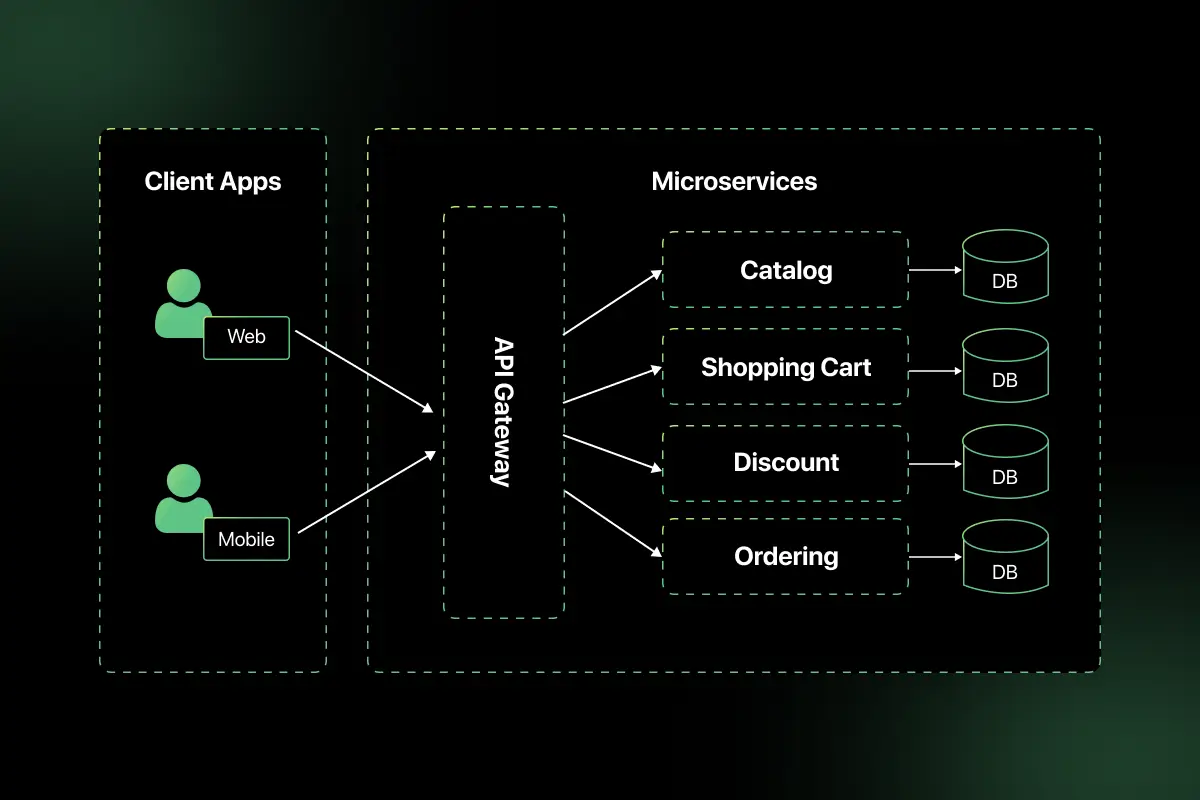
6. How does microservices architecture interact with REST APIs?
In microservices architecture:
- Each service exposes REST endpoints.
- Services communicate over HTTP.
- APIs are independently deployable.
- Service discovery and load balancing are used.
- API gateway manages external communication.
REST APIs act as communication interfaces between services and external clients.
Example: User service, Order service, and Payment service each expose independent REST APIs.
7. How would you design a secure multi-tenant REST API?
Multi-tenancy requires isolating tenant data securely.
Design strategies:
- Include tenant identifier in each request.
- Enforce role-based access control.
- Use strong authentication (OAuth 2.0 or JWT).
- Apply row-level security in databases.
- Encrypt sensitive data.
- Implement strict rate limiting per tenant.
- Log tenant-specific activity.
Example: Each API request includes a tenant ID validated against access tokens before processing.
8. What is idempotency key, and where is it used?
An idempotency key is a unique identifier used to ensure that repeated requests do not create duplicate operations.
It is commonly used in:
- Payment processing systems.
- Order creation APIs.
- Financial transactions.
Example flow:
- Client sends POST request with idempotency key.
- Server stores key with response.
- If same key is received again, server returns previous response instead of processing again.
This prevents duplicate transactions during network retries.
9. How do you handle backward compatibility in REST APIs?
Maintaining backward compatibility is critical when APIs evolve.
Best practices:
- Use API versioning.
- Avoid breaking changes in existing endpoints.
- Add new fields instead of removing old ones.
- Deprecate endpoints gradually.
- Maintain documentation for older versions.
- Use feature flags for controlled rollout.
Proper planning ensures existing clients continue functioning without disruption.
10. What are common performance bottlenecks in REST APIs?
Common bottlenecks include:
- Unoptimized database queries.
- Lack of caching.
- Large payload sizes.
- Excessive synchronous calls between services.
- Blocking I/O operations.
- Poor indexing in databases.
- Insufficient horizontal scaling.
- High network latency.
Performance can be improved using caching, asynchronous processing, database tuning, connection pooling, and load balancing.
11. How do you implement circuit breaker pattern in API calls?
The circuit breaker pattern prevents repeated calls to a failing service, protecting the system from cascading failures.
It works in three states:
- Closed – Requests flow normally.
- Open – Requests are blocked after failure threshold is exceeded.
- Half-Open – Limited test requests are allowed to check recovery.
Implementation steps:
- Monitor API failure rate and response time.
- Define threshold limits (e.g., 50% failures in 10 seconds).
- Automatically switch to open state when threshold is exceeded.
- Retry after a cooldown period.
Tools such as Resilience4j, Hystrix, or Spring Cloud Circuit Breaker are commonly used. This improves system stability and resilience in distributed systems.
12. How would you design retry mechanisms in REST clients?
Retry mechanisms handle transient failures like network timeouts or temporary server errors.
Design considerations:
- Retry only idempotent operations (GET, PUT).
- Use exponential backoff strategy.
- Limit maximum retry attempts.
- Implement jitter to avoid synchronized retries.
- Combine with circuit breaker pattern.
Example logic:
- If request fails with 503, wait 2 seconds.
- Retry with delay doubling each attempt.
- Stop after defined retry limit.
This ensures system reliability without overwhelming the server.
13. What is API throttling vs rate limiting?
| Feature | Rate Limiting | API Throttling |
| Purpose | Limit total requests over time | Control request burst speed |
| Example | 100 requests per minute | 10 requests per second |
| Trigger | Exceeding request quota | High sudden traffic spike |
| Response Code | 429 Too Many Requests | 429 or temporary delay |
Rate limiting enforces request quotas, while throttling smooths traffic spikes to protect system performance.
14. How do you design APIs for high availability?
High availability ensures minimal downtime and continuous service.
Key strategies:
- Deploy API servers across multiple availability zones.
- Use load balancers to distribute traffic.
- Implement health checks and auto-scaling.
- Use database replication and failover mechanisms.
- Cache frequently accessed data.
- Avoid single points of failure.
- Implement circuit breakers and retries.
Example: Deploy API instances across multiple regions with DNS failover to ensure service continuity.
15. How do you prevent replay attacks in REST APIs?
Replay attacks occur when a valid request is maliciously repeated.
Prevention techniques:
- Use HTTPS to encrypt communication.
- Include timestamps in requests.
- Use nonces (unique random values).
- Validate token expiration.
- Implement idempotency keys for critical operations.
- Use short-lived JWT tokens.
For example, a request with an expired timestamp or reused nonce should be rejected by the server.
16. How do you secure sensitive data in API payloads?
Securing payload data involves both transport and storage security.
Best practices:
- Use HTTPS to encrypt data in transit.
- Encrypt sensitive fields before storing.
- Avoid exposing confidential information in responses.
- Mask sensitive data in logs.
- Implement strong authentication and authorization.
- Use token-based access control.
Example: Never return full credit card numbers in API responses.
17. What is OpenAPI/Swagger, and how does it help in large systems?
OpenAPI is a specification for defining REST APIs in a machine-readable format. Swagger is a toolset built around the OpenAPI specification.
Benefits in large systems:
- Standardized API documentation.
- Auto-generation of client SDKs.
- Improved collaboration between teams.
- Automated API testing.
- Clear contract between frontend and backend.
Example: A Swagger UI allows developers to test API endpoints directly from documentation.
18. How would you implement logging and distributed tracing for APIs?
Logging captures application events, while distributed tracing tracks requests across multiple services.
Implementation approach:
- Log request ID, timestamp, status code, and latency.
- Use centralized logging tools such as ELK stack.
- Implement correlation IDs to track requests.
- Use tracing tools like Jaeger or Zipkin.
- Integrate cloud-native tools like AWS X-Ray.
Distributed tracing helps identify performance bottlenecks and failure points in microservices environments.
19. How do REST APIs work with load balancers?
Load balancers distribute incoming requests across multiple server instances to improve scalability and availability.
They:
- Route traffic using algorithms like round robin or least connections.
- Perform health checks.
- Terminate SSL if configured.
- Enable horizontal scaling.
Example: A load balancer routes client requests to healthy API servers behind it, ensuring no single server becomes overloaded.
20. When would you avoid using REST and prefer other architectures?
REST may not be ideal when:
- Real-time communication is required (prefer WebSockets).
- Clients need highly flexible data queries (prefer GraphQL).
- Streaming large data continuously (prefer gRPC or WebSockets).
- Extremely low latency is required (prefer gRPC).
- Complex distributed messaging systems are needed (prefer event-driven architecture).
REST works best for standard CRUD operations and stateless interactions but may not fit all use cases.
Scenario-Based Questions for REST API Interviews
1. A client application is sending repeated POST requests due to network retries, and duplicate orders are being created. How would you prevent this issue?
Duplicate resource creation usually occurs when POST requests are retried without protection.
Solution approach:
- Implement idempotency keys in POST requests.
- Require clients to send a unique idempotency key in request headers.
- Store the key with the response in the database.
- If the same key is received again, return the previous response instead of creating a new resource.
- Ensure database constraints prevent duplicate entries.
Example:
Idempotency-Key: 12345-unique-key
This ensures safe retries without duplicating transactions.
2. A frontend application hosted on a different domain cannot access your API due to a browser error. How would you resolve this?
This issue is caused by CORS (Cross-Origin Resource Sharing) restrictions.
Steps to resolve:
Enable CORS configuration on the server.
Add headers such as:
- Access-Control-Allow-Origin
- Access-Control-Allow-Methods
- Access-Control-Allow-Headers
Restrict allowed origins instead of using a wildcard in production.
Handle preflight OPTIONS requests correctly.
Proper CORS configuration allows secure cross-domain communication while maintaining browser security policies.
3. Your API is experiencing slow response times during peak traffic. How would you diagnose and improve performance?
Performance issues require systematic analysis.
Steps to diagnose:
- Check server CPU and memory usage.
- Analyze database query performance and indexing.
- Identify slow endpoints using monitoring tools.
- Review network latency and payload sizes.
- Check for excessive synchronous service calls.
Improvements:
- Implement caching (Redis or CDN).
- Optimize database queries.
- Add horizontal scaling with load balancers.
- Use asynchronous processing for heavy operations.
This approach ensures both root cause identification and scalable optimization.
4. Your API must support backward compatibility because multiple mobile app versions depend on it. How would you manage changes?
Backward compatibility requires careful version management.
Strategies:
- Introduce API versioning (e.g., /api/v1, /api/v2).
- Avoid removing existing fields; mark them as deprecated.
- Add new fields without breaking old clients.
- Maintain clear API documentation.
- Gradually sunset older versions with proper communication.
This ensures seamless upgrades without disrupting existing consumers.
5. (Advanced) You are designing a payment processing API that must handle high traffic, ensure transaction consistency, and prevent fraud. How would you architect it?
Designing a high-reliability payment API requires layered architecture.
Key design decisions:
- Use HTTPS for secure communication.
- Implement strong authentication (OAuth 2.0 or JWT).
- Use idempotency keys for safe retries.
- Apply rate limiting and throttling.
- Use circuit breaker pattern for downstream services.
- Implement distributed transactions using Saga pattern.
- Enable logging and distributed tracing.
- Use database constraints for transaction integrity.
- Deploy across multiple availability zones for high availability.
This ensures scalability, security, and consistency under high traffic conditions.
REST API MCQ Questions and Answers
Preparing for objective-based rounds is just as important as mastering REST concepts in depth. REST API MCQs help you quickly test your understanding of HTTP methods, status codes, authentication mechanisms, API design principles, caching, security, and performance optimization.
Practicing multiple-choice questions improves speed, accuracy, and clarity before technical interviews and written assessments. You can regularly practice structured REST API MCQs on PlacementPreparation.io to strengthen your fundamentals and perform confidently in API-related evaluation rounds.
Final words
Mastering REST API concepts is a key step toward building a strong foundation in modern web development.
By understanding core principles like HTTP methods, statelessness, authentication, and API design, freshers can approach interviews with clarity and confidence.
Consistent practice and real-world application of these concepts will not only help you crack interviews but also prepare you for real project environments in the industry.
FAQs
The most commonly asked REST API interview questions focus on HTTP methods, status codes, REST constraints, authentication mechanisms like JWT and OAuth, caching strategies, and API versioning.
You should understand REST architectural principles clearly and practice designing endpoints, handling authentication, managing errors, and optimizing performance.
REST is an architectural style that defines constraints for building web services, while a RESTful API is an API that follows those REST principles. A RESTful API properly implements statelessness, resource-based URLs, and standard HTTP methods.
Yes, security is a major focus in REST API interviews because APIs expose application functionality over the internet. Questions often cover authentication, authorization, encryption, rate limiting, and preventing replay attacks.
REST is ideal for stateless, resource-based systems that require scalability and simplicity. However, for real-time communication, complex data queries, or streaming use cases, alternatives like GraphQL, gRPC, or WebSockets may be more suitable.



Aarthy is a passionate technical writer with diverse experience in web development, Web 3.0, AI, ML, and technical documentation. She has won over six national-level hackathons and blogathons. Additionally, she mentors students across communities, simplifying complex tech concepts for learners.



Aarthy is a passionate technical writer with diverse experience in web development, Web 3.0, AI, ML, and technical documentation. She has won over six national-level hackathons and blogathons. Additionally, she mentors students across communities, simplifying complex tech concepts for learners.
Related Posts

System Design Interview Questions and Answers
Are you preparing for system design interviews and wondering what kind of architectural questions you might face? System design interviews test …


Warning: Undefined variable $post_id in /var/www/wordpress/wp-content/themes/placementpreparation/template-parts/popup-zenlite.php on line 1050
so far feels like...
