Computer Networks Interview Questions and Answers
Are you preparing for a networking interview and wondering what type of questions you might face?
Computer Networks is a core subject in technical interviews, covering protocols, routing, security, troubleshooting, and real-world network design concepts.
This guide provides structured Computer Networks interview questions categorized by difficulty level to help you strengthen your conceptual clarity and practical understanding for technical interviews.
Computer Networks Interview Questions for Freshers
1. What is a computer network, and why is it needed?
A computer network is a collection of interconnected devices such as computers, servers, routers, and switches that communicate with each other to share data and resources. These devices are connected through wired or wireless communication channels and follow standardized protocols to exchange information.
Computer networks are needed to enable data sharing, communication, centralized management, and resource utilization. For example, in an organization, employees can share printers, access shared storage, communicate via email, and access the internet through a common network infrastructure. Without networks, data exchange would be isolated and inefficient.
2. Explain the OSI model and its seven layers.
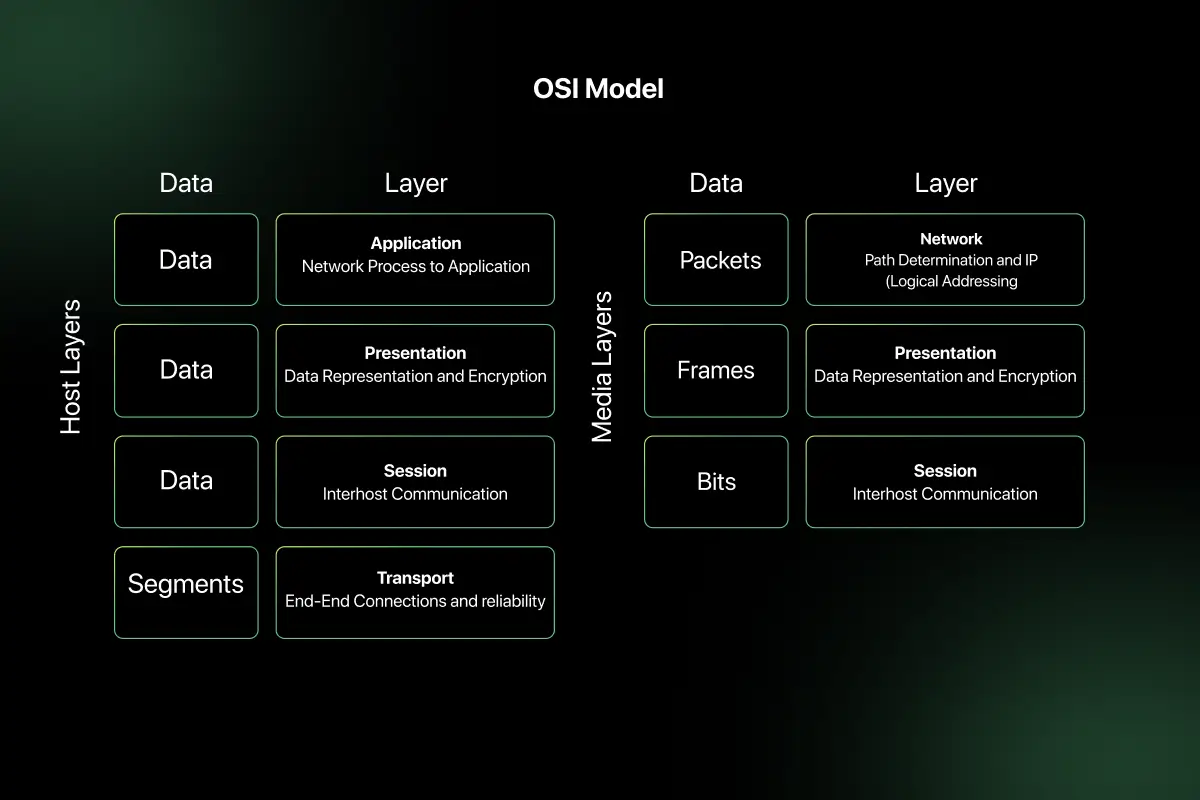
The OSI (Open Systems Interconnection) model is a conceptual framework used to understand and standardize network communication. It divides communication into seven layers, each responsible for a specific function.
The seven layers are:
- Physical Layer – Handles transmission of raw bits over a physical medium such as cables or radio signals.
- Data Link Layer – Manages error detection, framing, and MAC addressing.
- Network Layer – Handles logical addressing and routing (IP addresses).
- Transport Layer – Ensures reliable data delivery using protocols like TCP and UDP.
- Session Layer – Manages sessions and connections between applications.
- Presentation Layer – Handles encryption, compression, and data formatting.
- Application Layer – Provides services directly to user applications (HTTP, FTP, SMTP).
The OSI model helps network engineers understand where problems occur and how data moves from one system to another.
3. Compare OSI model and TCP/IP model.
| Feature | OSI Model | TCP/IP Model |
| Number of Layers | 7 layers | 4 layers |
| Type | Conceptual model | Practical implementation model |
| Developed By | ISO | DARPA |
| Application Layer | Separate layers for Application, Presentation, Session | Combined into one Application layer |
| Transport Layer | Transport layer defined | Transport layer defined |
| Network Layer | Network layer defined | Internet layer defined |
| Usage | Teaching and reference | Real-world networking |
The OSI model is mainly used for understanding networking concepts, while the TCP/IP model is used for actual internet communication.
4. What is the difference between LAN, MAN, and WAN?
| Feature | LAN (Local Area Network) | MAN (Metropolitan Area Network) | WAN (Wide Area Network) |
| Coverage Area | Small area (office, campus) | City-level coverage | Large geographic area (countries/continents) |
| Speed | High speed | Moderate to high | Slower compared to LAN |
| Ownership | Privately owned | Public or private | Usually ISP-managed |
| Example | Office network | City-wide fiber network | Internet |
LAN connects devices within a small area, MAN covers a city, and WAN connects multiple LANs across large distances.
5. What is a protocol in networking?
A protocol is a set of predefined rules that govern how data is transmitted and received across a network. It defines how devices identify each other, how data is structured, and how errors are handled.
Examples of networking protocols include:
- HTTP for web communication
- TCP for reliable transport
- IP for logical addressing
- FTP for file transfer
Protocols ensure that devices from different manufacturers can communicate effectively and reliably.
6. What is the difference between TCP and UDP?
| Feature | TCP | UDP |
| Connection Type | Connection-oriented | Connectionless |
| Reliability | Reliable | Unreliable |
| Error Checking | Yes | Minimal |
| Speed | Slower | Faster |
| Use Case | Web browsing, email | Streaming, gaming |
TCP establishes a connection before transmitting data and ensures reliable delivery using acknowledgments and retransmissions. UDP sends data without establishing a connection and does not guarantee delivery, making it faster but less reliable.
7. What is an IP address?
An IP (Internet Protocol) address is a unique numerical identifier assigned to a device connected to a network. It enables devices to locate and communicate with each other over a network.
For example, an IPv4 address looks like:
192.168.1.10
An IP address consists of two parts:
- Network portion (identifies the network)
- Host portion (identifies the device within the network)
IP addresses are essential for routing data across networks.
8. What is the difference between IPv4 and IPv6?
| Feature | IPv4 | IPv6 |
| Address Length | 32-bit | 128-bit |
| Format | Decimal (e.g., 192.168.1.1) | Hexadecimal (e.g., 2001:db8::1) |
| Address Space | Limited (approx. 4.3 billion) | Extremely large |
| Security | Optional | Built-in IPsec |
| NAT Requirement | Often required | Usually not required |
IPv6 was introduced to overcome IPv4 address exhaustion and improve scalability and security.
9. What is a MAC address?
A MAC (Media Access Control) address is a unique hardware identifier assigned to a network interface card (NIC). It operates at the Data Link Layer of the OSI model.
A MAC address typically looks like:
00:1A:2B:3C:4D:5E
It is used for communication within a local network and helps switches identify devices for data forwarding.

10. What is DNS, and how does it work?
DNS (Domain Name System) translates human-readable domain names into IP addresses.
DNS works in the following steps:
- User enters domain name in browser.
- Browser checks local cache.
- Request goes to DNS resolver.
- Resolver queries root, TLD, and authoritative DNS servers.
- IP address is returned.
- Browser connects to the server using the IP address.
DNS makes internet usage easier by eliminating the need to remember numerical IP addresses.
11. What is the difference between hub, switch, and router?
| Feature | Hub | Switch | Router |
| OSI Layer | Physical Layer | Data Link Layer | Network Layer |
| Data Forwarding | Broadcasts to all devices | Forwards to specific MAC address | Routes based on IP address |
| Intelligence | No intelligence | Moderate intelligence | High intelligence |
| Collision Domain | Shared | Separate per port | Separate networks |
Use Case |
Small/basic networks | Local area networks | Connect different networks |
A hub simply broadcasts incoming data to all connected devices, which can cause collisions and inefficiency. A switch forwards data only to the intended device using MAC addresses, improving performance. A router connects different networks and determines the best path for data using IP addresses.
12. What is subnetting, and why is it used?
Subnetting is the process of dividing a larger IP network into smaller, manageable sub-networks called subnets.
It is used to:
- Improve network organization.
- Reduce broadcast traffic.
- Enhance security by isolating segments.
- Efficiently utilize IP address space.
- Improve routing efficiency.
For example, a company with IP range 192.168.1.0/24 can divide it into smaller subnets such as 192.168.1.0/26 to create separate departments within the same organization.
Subnetting improves scalability and performance in structured networks.
13. What is the purpose of ARP?
ARP (Address Resolution Protocol) is used to map an IP address to a MAC address within a local network.
When a device wants to send data to another device on the same LAN:
- It checks its ARP cache.
- If no mapping exists, it sends an ARP request broadcast.
- The device with the matching IP replies with its MAC address.
- The sender updates its ARP table and sends the data.
ARP operates at the boundary of the Network and Data Link layers and is essential for local network communication.
14. What is the difference between HTTP and HTTPS?
| Feature | HTTP | HTTPS |
| Security | Not encrypted | Encrypted using SSL/TLS |
| Port | 80 | 443 |
| Data Protection | Vulnerable to interception | Secure data transmission |
| Authentication | No certificate required | Requires SSL certificate |
| Use Case | Non-sensitive data | Secure transactions |
HTTPS is essentially HTTP with encryption, ensuring confidentiality and integrity of transmitted data.
15. What is a firewall?
A firewall is a network security device or software that monitors and controls incoming and outgoing network traffic based on predefined security rules.
It acts as a barrier between trusted and untrusted networks.
Types of firewalls include:
- Packet-filtering firewall
- Stateful inspection firewall
- Proxy firewall
- Next-generation firewall
Firewalls help prevent unauthorized access, protect against cyberattacks, and enforce network security policies.
16. What is the difference between connection-oriented and connectionless communication?
| Feature | Connection-Oriented | Connectionless |
| Setup | Requires connection setup | No prior connection required |
| Reliability | Reliable | Not guaranteed |
| Error Handling | Yes | Minimal |
| Example Protocol | TCP | UDP |
Connection-oriented communication establishes a connection before data transfer and ensures reliable delivery. Connectionless communication sends data without establishing a session and does not guarantee delivery.
17. What is bandwidth and latency?
Bandwidth refers to the maximum amount of data that can be transmitted over a network in a given time, typically measured in Mbps or Gbps.
Latency refers to the time delay between sending and receiving data.
For example, a network with high bandwidth can transfer large files quickly, while low latency ensures faster response times in real-time applications like video calls.
Both metrics are critical for evaluating network performance.
18. What is packet switching?
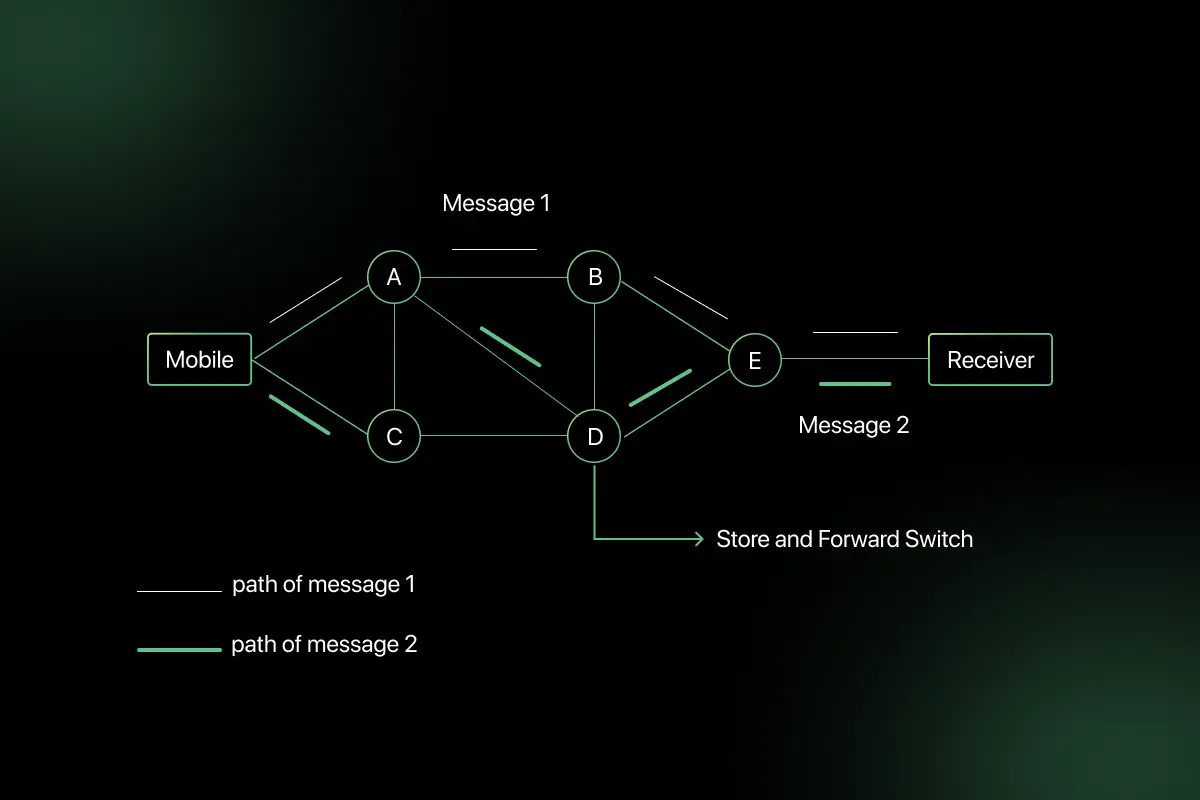
Packet switching is a method of transmitting data where information is divided into small packets before being sent over a network.
Each packet contains:
- Source address
- Destination address
- Sequence number
- Payload data
Packets may take different paths and are reassembled at the destination.
The internet uses packet switching because it efficiently utilizes network resources and supports scalable communication.
19. What is the difference between private IP and public IP?
| Feature | Private IP | Public IP |
| Scope | Used within local networks | Used on the internet |
| Routable | Not directly routable on internet | Globally routable |
| Assigned By | Local network admin/router | ISP |
| Example | 192.168.1.1 | 8.8.8.8 |
Private IP addresses are used internally within organizations, while public IP addresses are accessible over the internet.
20. What is NAT, and why is it used?
NAT (Network Address Translation) is a technique used to translate private IP addresses into public IP addresses when accessing external networks.
It is used to:
- Conserve IPv4 addresses.
- Enhance security by hiding internal IP addresses.
- Allow multiple devices to share a single public IP.
For example, in a home network, multiple devices with private IP addresses access the internet through a single public IP using NAT.
NAT plays a critical role in modern internet connectivity and IP address management
Computer Network Interview Questions for Intermediate
1. How does TCP three-way handshake work?
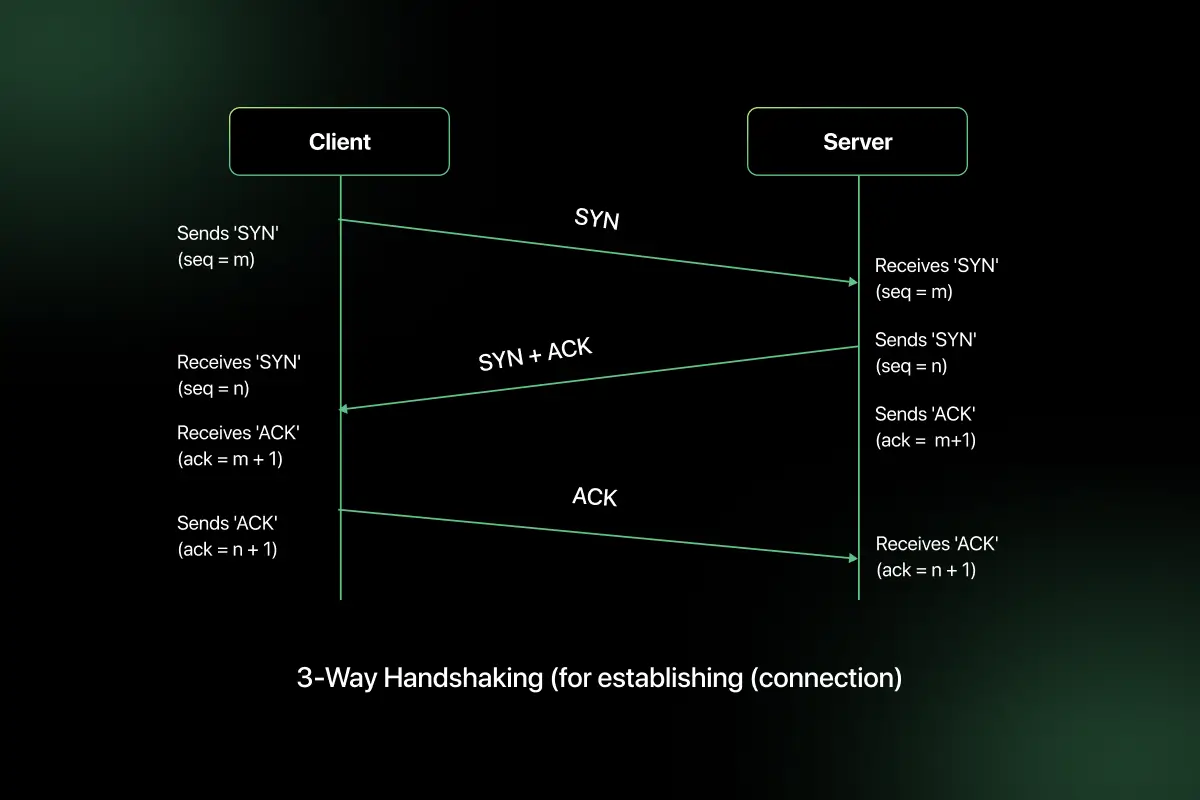
The TCP three-way handshake establishes a reliable connection between a client and a server before data transmission begins.
The process involves three steps:
- SYN – The client sends a SYN (synchronize) packet with an initial sequence number to request a connection.
- SYN-ACK – The server responds with a SYN-ACK packet, acknowledging the client’s sequence number and sending its own sequence number.
- ACK – The client sends an ACK packet acknowledging the server’s sequence number.
After this exchange, the connection is established and both sides are ready to transmit data. This mechanism ensures synchronization of sequence numbers and confirms that both devices are ready to communicate.
2. Explain the TCP four-way termination process.
TCP connection termination uses a four-step process to gracefully close a connection.
- FIN – One side sends a FIN (finish) packet indicating it has finished sending data.
- ACK – The other side acknowledges the FIN.
- FIN – The receiving side sends its own FIN when it has completed data transmission.
- ACK – The original sender acknowledges the second FIN.
This process ensures that both sides finish transmitting data before the connection is closed. It prevents abrupt termination and data loss.
3. What is sliding window protocol?
The sliding window protocol is a flow control mechanism used by TCP to control the amount of data that can be sent before receiving an acknowledgment.
It allows the sender to transmit multiple packets without waiting for individual acknowledgments. The size of the window determines how much data can be sent at once.
For example, if the window size is 4 packets, the sender can send four packets before waiting for acknowledgment. As acknowledgments are received, the window “slides” forward, allowing new packets to be sent.
This improves network efficiency and maximizes throughput.
4. What are TCP congestion control mechanisms?
TCP uses congestion control algorithms to prevent network overload.
The main mechanisms are:
- Slow Start – Starts with a small congestion window and increases it exponentially.
- Congestion Avoidance – After reaching a threshold, window increases linearly.
- Fast Retransmit – Retransmits lost packets when duplicate ACKs are received.
- Fast Recovery – Reduces congestion window and avoids restarting from slow start.
These mechanisms help maintain network stability and prevent congestion collapse.
5. Compare TCP flow control and congestion control.
| Feature | Flow Control | Congestion Control |
| Purpose | Prevent receiver overload | Prevent network overload |
| Managed By | Receiver | Sender |
| Mechanism | Sliding window | Congestion window |
| Scope | End-to-end | Network-wide |
| Example | Receiver limits buffer size | Sender reduces sending rate during congestion |
Flow control ensures the receiver can handle incoming data, while congestion control ensures the overall network is not overwhelmed.
6. How do you calculate subnet masks?
A subnet mask determines which portion of an IP address represents the network and which represents the host.
To calculate a subnet mask:
- Determine required number of subnets or hosts.
- Borrow bits from the host portion.
- Convert borrowed bits into decimal format.
For example:
IP: 192.168.1.0/24
If 2 bits are borrowed → /26
Binary subnet mask for /26:
11111111.11111111.11111111.11000000
Decimal form:
255.255.255.192
Subnet masks help divide networks efficiently.
7. What is CIDR notation?
CIDR (Classless Inter-Domain Routing) notation is a method for representing IP addresses and subnet masks compactly.
Format:
IP address / prefix length
Example:
192.168.1.0/24
Here, “/24” indicates that the first 24 bits represent the network portion.
CIDR allows flexible subnet allocation and improves IP address utilization compared to traditional class-based addressing.
8. How do you determine number of hosts in a subnet?
The number of hosts in a subnet is calculated using:
2ⁿ − 2
Where:
n = number of host bits
Subtract 2 for network and broadcast addresses
Example:
For /26:
Total bits = 32
Network bits = 26
Host bits = 6
Number of hosts = 2⁶ − 2 = 64 − 2 = 62 usable hosts
This formula helps determine capacity for devices within a subnet.
9. What is default gateway?
A default gateway is the IP address of the router that connects a local network to external networks.
When a device needs to send data outside its local subnet, it forwards the packet to the default gateway.
For example:
Device IP: 192.168.1.10
Subnet: 192.168.1.0/24
Default Gateway: 192.168.1.1
The router then forwards traffic to the appropriate external destination.
10. What is the difference between static routing and dynamic routing?
| Feature | Static Routing | Dynamic Routing |
| Configuration | Manually configured | Automatically updated |
| Scalability | Suitable for small networks | Suitable for large networks |
| Protocol Usage | No routing protocol required | Uses routing protocols |
| Maintenance | High manual effort | Automatic route updates |
| Example | Fixed route in small office | OSPF or BGP in enterprises |
Static routing is simple but requires manual updates, while dynamic routing automatically adjusts routes using protocols such as OSPF, RIP, or BGP.
11. What are routing protocols? Explain RIP and OSPF.
Routing protocols are standardized methods used by routers to exchange information about network paths and determine the best route for forwarding packets.
They dynamically update routing tables based on network topology changes.
RIP (Routing Information Protocol):
- Distance-vector routing protocol.
- Uses hop count as routing metric.
- Maximum hop count is 15.
- Suitable for small networks.
- Simpler but slower convergence.
OSPF (Open Shortest Path First):
- Link-state routing protocol.
- Uses cost (based on bandwidth) as metric.
- Supports hierarchical design using areas.
- Faster convergence than RIP.
- Suitable for large enterprise networks.
RIP is simple but limited, while OSPF is scalable and efficient for larger networks.
12. What is the difference between OSPF and BGP?
| Feature | OSPF | BGP |
| Type | Interior Gateway Protocol (IGP) | Exterior Gateway Protocol (EGP) |
| Usage | Within an organization | Between organizations/ISPs |
| Metric | Cost (bandwidth-based) | Path attributes |
| Convergence | Faster | Slower but more stable |
| Network Scope | Internal routing | Internet-scale routing |
OSPF is used inside enterprise networks, while BGP is used to route traffic across the internet between autonomous systems.
13. What is VLAN?
VLAN (Virtual Local Area Network) is a logical grouping of devices within a physical network that allows segmentation without changing physical infrastructure.
It operates at Layer 2 and helps:
- Reduce broadcast domains.
- Improve security.
- Improve network performance.
- Organize network by departments.
For example, in an office:
- VLAN 10 – HR
- VLAN 20 – Finance
- VLAN 30 – IT
Even if devices are connected to the same switch, VLAN ensures logical separation.
14. What is STP (Spanning Tree Protocol)?
STP (Spanning Tree Protocol) is a network protocol that prevents loops in Ethernet networks.
Loops occur when redundant paths exist between switches, causing broadcast storms and network instability.
STP works by:
- Electing a root bridge.
- Identifying redundant paths.
- Blocking certain ports to prevent loops.
- Automatically reactivating blocked ports if a primary link fails.
STP ensures loop-free topology while maintaining redundancy.
15. What is the difference between Layer 2 and Layer 3 switch?
| Feature | Layer 2 Switch | Layer 3 Switch |
| OSI Layer | Data Link Layer | Network Layer |
| Addressing | Uses MAC address | Uses IP address |
| Routing Capability | No routing | Supports routing |
| Inter-VLAN Routing | Requires router | Can perform internally |
| Use Case | Basic switching | Enterprise networks |
Layer 2 switches forward traffic within the same network, while Layer 3 switches can perform routing between different VLANs or networks.
16. How would you troubleshoot slow network performance?
Troubleshooting slow network performance requires systematic analysis.
Steps include:
- Check bandwidth usage and congestion.
- Verify CPU and memory usage on networking devices.
- Test latency and packet loss using ping and traceroute.
- Analyze switch and router logs.
- Check for duplex mismatches.
- Inspect DNS resolution delays.
- Identify high broadcast traffic.
- Verify firewall rules.
Using tools like Wireshark and network monitoring systems helps isolate performance bottlenecks effectively.
17. What happens when you type a URL in the browser?
When a user types a URL:
- The browser checks DNS cache.
- If not found, it queries DNS server for IP address.
- Browser establishes TCP connection using three-way handshake.
- If HTTPS, SSL/TLS handshake occurs.
- HTTP request is sent to server.
- Server processes request and sends response.
- Browser renders HTML, CSS, and JavaScript.
This entire process happens within milliseconds and involves multiple networking layers.
18. What is DNS cache poisoning?
DNS cache poisoning is a cyberattack where an attacker injects false DNS records into a DNS resolver’s cache.
As a result:
- Users are redirected to malicious websites.
- Credentials and sensitive data may be stolen.
- Attackers exploit weaknesses in DNS validation.
Prevention methods include:
- DNSSEC implementation.
- Secure DNS servers.
- Randomized source ports.
- Strong cache validation policies.
DNS cache poisoning compromises trust in domain resolution systems.
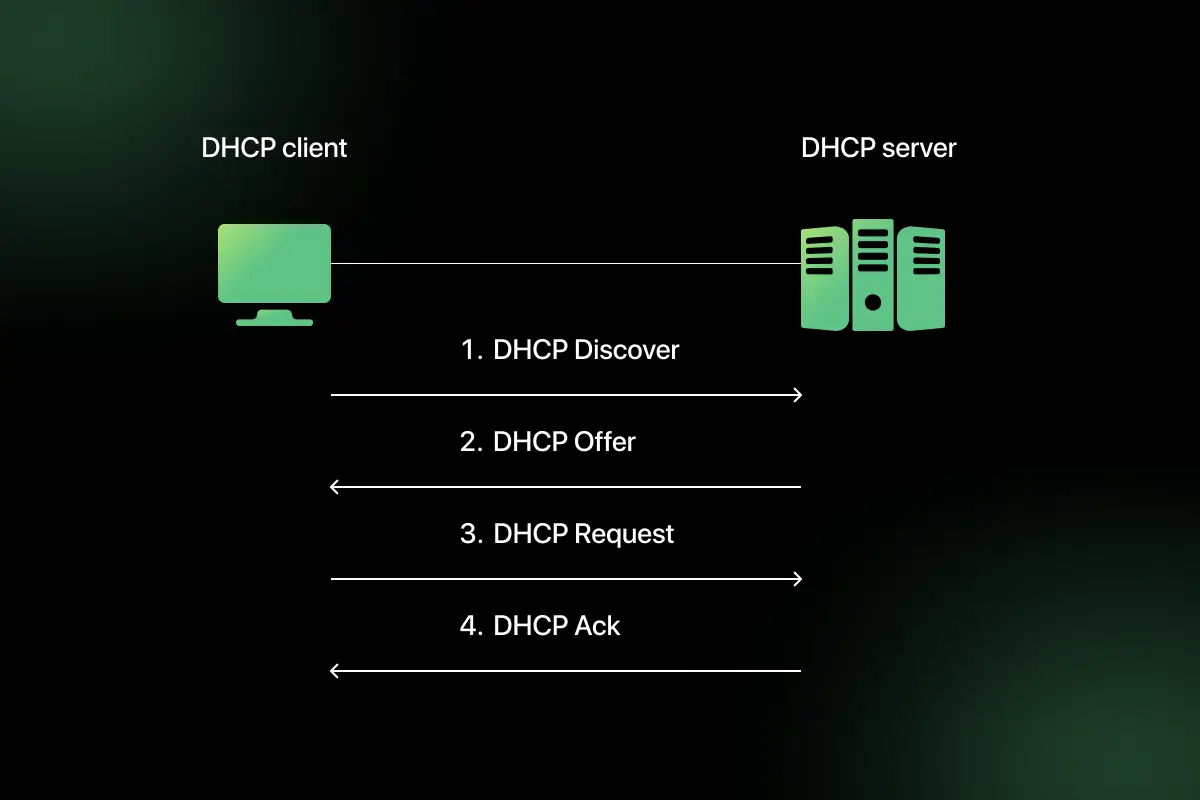
19. What is DHCP and how does it work?
DHCP (Dynamic Host Configuration Protocol) automatically assigns IP addresses to devices in a network.
It works using a four-step process called DORA:
- Discover – Client broadcasts request for IP address.
- Offer – DHCP server offers an available IP.
- Request – Client requests the offered IP.
- Acknowledge – Server confirms and assigns IP.
DHCP simplifies network management by eliminating manual IP configuration.
20. What is port forwarding?
Port forwarding is a networking technique that redirects communication requests from one address and port number to another.
It is commonly used when:
- Hosting a web server inside a private network.
- Allowing external access to internal services.
- Enabling remote desktop access.
Example:
External request on public IP port 80 → Forwarded to internal IP 192.168.1.10 port 80.
Port forwarding works with NAT to enable controlled external access to internal devices.
Computer Network Interview Questions for Experienced
1. How does TCP ensure reliable data transmission?
TCP ensures reliable data transmission through multiple mechanisms designed to detect and recover from errors.
Key reliability features include:
- Sequence Numbers – Each byte of data is assigned a sequence number to ensure correct ordering.
- Acknowledgments (ACKs) – Receiver sends ACK for received data.
- Retransmissions – Lost packets are retransmitted if ACK is not received within timeout.
- Checksum – Detects data corruption.
- Flow Control – Uses sliding window to prevent receiver overload.
- Congestion Control – Adjusts sending rate based on network conditions.
For example, if a packet is lost during transmission, the sender retransmits it after detecting missing acknowledgment. These mechanisms collectively guarantee ordered and reliable delivery.
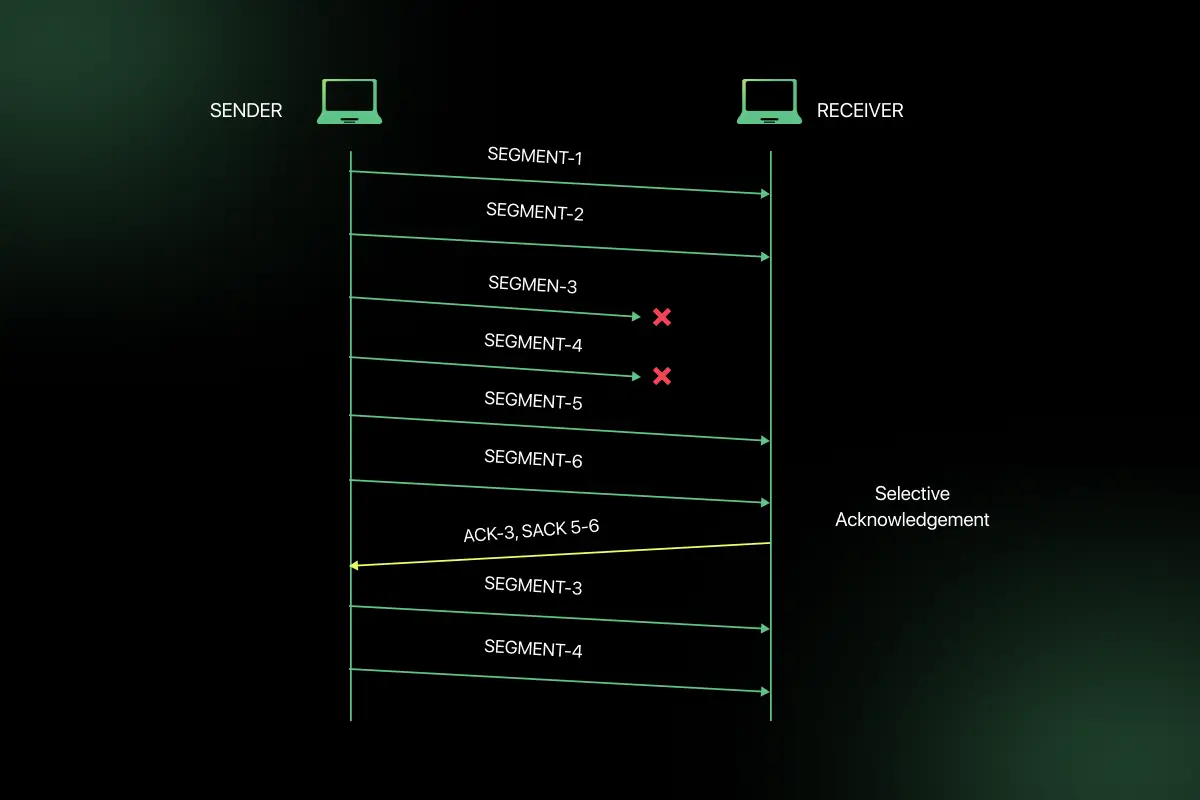
2. Explain selective acknowledgment (SACK).
Selective Acknowledgment (SACK) is a TCP enhancement that allows the receiver to inform the sender about all successfully received segments, not just the next expected one.
In standard TCP, if one packet is lost, the sender may retransmit multiple packets unnecessarily. With SACK:
- The receiver specifies exactly which packets were received.
- The sender retransmits only missing segments.
- Improves performance in high-latency or lossy networks.
SACK increases efficiency by minimizing redundant retransmissions.
3. What is MTU and how does fragmentation occur?
MTU (Maximum Transmission Unit) is the largest size of a packet that can be transmitted over a network interface without fragmentation.
For Ethernet, the typical MTU is 1500 bytes.
Fragmentation occurs when:
- A packet exceeds the MTU of the network path.
- The IP layer splits the packet into smaller fragments.
- Each fragment carries its own header.
- The destination reassembles the fragments.
Excessive fragmentation can reduce performance and increase processing overhead. Path MTU Discovery is used to determine optimal packet size.
4. What are different types of network attacks?
Common network attacks include:
- DDoS (Distributed Denial of Service) – Overwhelms network resources.
- Man-in-the-Middle (MITM) – Intercepts communication between parties.
- Phishing – Tricks users into revealing sensitive information.
- IP Spoofing – Attacker disguises IP address.
- ARP Spoofing – Manipulates ARP tables.
- DNS Spoofing – Redirects users to malicious sites.
- Port Scanning – Identifies open ports for exploitation.
Network security mechanisms such as firewalls, IDS/IPS, encryption, and monitoring tools help mitigate these threats.
5. How does SSL/TLS handshake work?
SSL/TLS handshake establishes a secure encrypted connection between client and server.
The process includes:
- Client Hello – Client sends supported encryption algorithms.
- Server Hello – Server selects encryption method and sends digital certificate.
- Certificate Verification – Client verifies server’s certificate using CA.
- Key Exchange – Secure session key is generated.
- Secure Communication – Data is encrypted using session key.
This handshake ensures authentication, confidentiality, and integrity of data during transmission.
6. How does BGP work in large-scale networks?
BGP (Border Gateway Protocol) is the routing protocol used on the internet to exchange routing information between autonomous systems (AS).
Key characteristics:
- Path-vector protocol.
- Uses attributes like AS path, next-hop, and local preference.
- Prevents routing loops.
- Selects best path based on policies rather than just shortest distance.
BGP enables global internet routing by connecting ISPs and large organizations.
7. What is MPLS?
MPLS (Multiprotocol Label Switching) is a technique used to speed up packet forwarding in large networks.
Instead of routing based on IP lookup at each hop, MPLS:
- Assigns labels to packets.
- Uses label switching.
- Routes packets based on labels.
Benefits:
- Faster forwarding.
- Traffic engineering.
- Improved QoS support.
- Supports VPN services.
MPLS is widely used in ISP backbone networks.
8. Explain load balancing in networks.
Load balancing distributes incoming network traffic across multiple servers or paths to improve availability and performance.
Types of load balancing:
- Round Robin
- Least Connections
- IP Hash
- Layer 4 (Transport-based)
- Layer 7 (Application-based)
Benefits:
- Prevents server overload.
- Improves fault tolerance.
- Enhances scalability.
Load balancers are commonly used in web server farms and cloud environments.
9. How do CDNs improve network performance?
CDNs (Content Delivery Networks) distribute content across geographically distributed servers.
When a user requests content:
- The request is routed to the nearest CDN edge server.
- Content is delivered from local cache.
- Reduces latency and load on origin server.
Benefits:
- Faster content delivery.
- Reduced bandwidth costs.
- Improved availability.
- Enhanced user experience.
CDNs are widely used for websites, streaming services, and large-scale web applications.
10. What is QoS (Quality of Service)?
QoS refers to techniques used to manage network traffic to ensure reliable performance for critical applications.
QoS mechanisms include:
- Traffic prioritization.
- Bandwidth allocation.
- Traffic shaping.
- Packet classification.
- Queue management.
For example, voice and video traffic can be prioritized over bulk data transfers to maintain call quality.
QoS ensures predictable performance in congested networks.
11. How do firewalls differ from IDS and IPS?
| Feature | Firewall | IDS (Intrusion Detection System) | IPS (Intrusion Prevention System) |
| Primary Function | Filters traffic based on rules | Detects suspicious activity | Detects and blocks malicious activity |
| Traffic Handling | Allows or blocks traffic | Monitors and alerts | Monitors and actively blocks |
| Position | Network perimeter | Inside network | Inline within traffic path |
| Action | Preventive | Detective | Preventive and corrective |
A firewall controls access based on predefined rules such as IP, port, and protocol. An IDS monitors traffic and generates alerts when suspicious activity is detected. An IPS not only detects but also actively blocks malicious traffic in real time. In enterprise networks, these systems are often used together to provide layered security.
12. What is Zero Trust Networking?
Zero Trust Networking is a security model based on the principle of “never trust, always verify.” It assumes that no user, device, or system is trusted by default, even if it is inside the network.
Key principles include:
- Continuous authentication and authorization.
- Least privilege access.
- Micro-segmentation of networks.
- Strict identity verification.
- Real-time monitoring.
Unlike traditional perimeter-based security, Zero Trust protects internal resources by validating every access request. This approach reduces lateral movement of attackers within the network.
13. How does VPN work?
A VPN (Virtual Private Network) creates a secure, encrypted tunnel between a user and a remote network.
The process works as follows:
- User connects to VPN server.
- Authentication is performed.
- Encrypted tunnel is established.
- All traffic passes through the encrypted tunnel.
- Data appears to originate from VPN server’s IP.
VPNs use encryption protocols such as IPsec or SSL/TLS. They provide confidentiality, data integrity, and secure remote access to internal networks.
14. What are common DDoS mitigation techniques?
DDoS (Distributed Denial of Service) attacks attempt to overwhelm a server with massive traffic.
Common mitigation techniques include:
- Rate limiting incoming requests.
- Using Content Delivery Networks (CDNs).
- Deploying Web Application Firewalls (WAF).
- Traffic filtering and blacklisting.
- Anycast routing to distribute traffic.
- Load balancing across multiple servers.
- Using cloud-based DDoS protection services.
Proactive monitoring and scalable infrastructure are essential to withstand large-scale DDoS attacks.
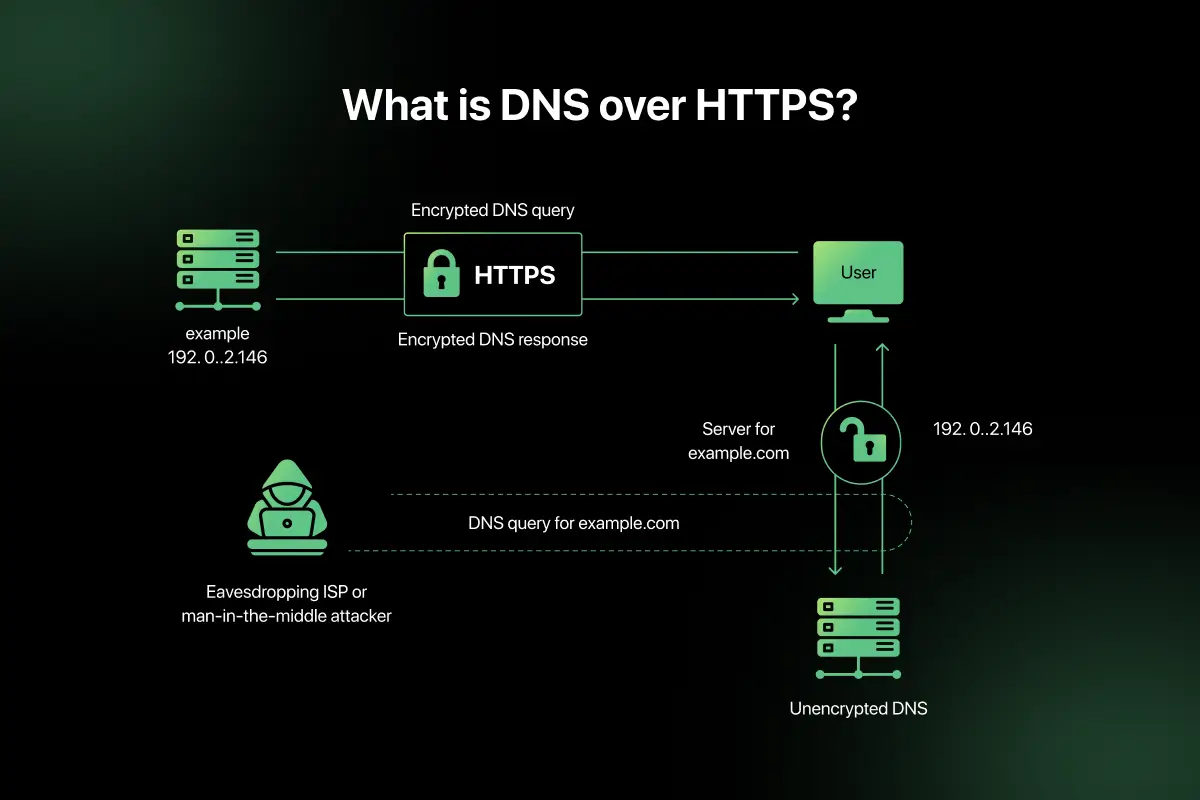
15. How does DNS over HTTPS improve privacy?
DNS over HTTPS (DoH) encrypts DNS queries using HTTPS protocol.
In traditional DNS:
- Queries are sent in plain text.
- ISPs and attackers can monitor DNS traffic.
With DoH:
- DNS requests are encrypted.
- Prevents interception and tampering.
- Improves privacy and security.
- Reduces risk of DNS spoofing.
DoH enhances confidentiality by protecting DNS resolution from surveillance and manipulation.
16. If a server is reachable locally but not externally, how would you debug?
To troubleshoot this issue, follow a structured approach:
- Verify public IP configuration.
- Check firewall rules allowing inbound traffic.
- Confirm port forwarding settings on router.
- Ensure correct DNS mapping.
- Validate NAT configuration.
- Check ISP restrictions.
- Test connectivity using tools like ping, traceroute, and telnet.
Often, misconfigured firewall rules or incorrect NAT settings prevent external access while local access remains functional.
17. How would you diagnose packet loss in a network?
Diagnosing packet loss involves identifying where packets are being dropped.
Steps include:
- Use ping to measure packet loss percentage.
- Use traceroute to identify problematic hops.
- Monitor bandwidth utilization.
- Check interface statistics for errors.
- Inspect physical cables and hardware.
- Analyze network congestion levels.
- Use packet capture tools like Wireshark.
Packet loss can occur due to congestion, faulty hardware, interference, or misconfiguration.
18. How would you design a highly available enterprise network?
A highly available enterprise network requires redundancy and fault tolerance.
Key design principles:
- Redundant routers and switches.
- Multiple internet service providers.
- Load balancing.
- Failover mechanisms.
- Spanning Tree Protocol configuration.
- Redundant power supplies.
- High availability clustering.
- Monitoring and automated alerts.
Deploying infrastructure across multiple data centers further enhances availability and resilience.
19. How do you isolate broadcast storms?
Broadcast storms occur when excessive broadcast traffic overwhelms a network.
To isolate:
- Identify loops in network topology.
- Enable Spanning Tree Protocol (STP).
- Segment network using VLANs.
- Monitor broadcast traffic levels.
- Check for misconfigured devices.
- Disconnect suspected segments.
Proper switch configuration and network segmentation prevent broadcast storm propagation.
20. What trade-offs do you consider in network design between cost, performance, and security?
Network design involves balancing multiple factors.
- Cost vs Performance – High-performance hardware increases expense.
- Security vs Usability – Strict security policies may reduce convenience.
- Redundancy vs Budget – High availability requires additional infrastructure.
- Scalability vs Simplicity – Scalable networks are more complex.
- Latency vs Encryption – Security encryption may introduce slight delays.
An effective network design aligns business requirements with acceptable risk, performance expectations, and budget constraints
Scenario-Based Questions for Computer Networks Interviews
1. A user in an office can access internal shared drives but cannot open any websites on the internet. What could be the possible issue and how would you troubleshoot it?
If the user can access internal resources but not external websites, the issue is likely related to internet routing or DNS configuration rather than local connectivity.
Troubleshooting steps include:
- Verify the user’s IP configuration using ipconfig or ifconfig.
- Check if the default gateway is correctly configured.
- Test connectivity to the gateway using ping.
- Ping an external IP address (e.g., 8.8.8.8) to check internet routing.
- If IP works but domain names do not, verify DNS server configuration.
- Inspect firewall or proxy settings blocking outbound traffic.
In most cases, incorrect DNS configuration or missing default gateway causes such issues.
2. Two devices in the same LAN cannot communicate with each other, even though both have valid IP addresses. What might be the reason?
If both devices have valid IP addresses but cannot communicate, the issue may lie at the Data Link or configuration level.
Possible causes include:
- Devices placed in different VLANs.
- Incorrect subnet mask configuration.
- Firewall blocking internal communication.
- MAC address table issues in the switch.
- Disabled network interface.
First, confirm both devices belong to the same subnet and VLAN. Then verify ARP table entries and switch configuration to isolate the problem.
3. A company reports that video conferencing applications are experiencing high jitter and latency during peak hours. How would you address this issue?
High jitter and latency during peak hours indicate network congestion or lack of traffic prioritization.
Solution approach:
- Monitor bandwidth utilization to identify congestion points.
- Implement Quality of Service (QoS) to prioritize real-time traffic.
- Separate voice and video traffic using VLAN segmentation.
- Upgrade bandwidth capacity if saturation is observed.
- Check for packet loss and optimize routing paths.
- Analyze switch queue management and buffer configuration.
Prioritizing real-time traffic using QoS ensures stable performance for delay-sensitive applications.
4. After implementing a new switch in the network, users report intermittent connectivity issues. What could be the cause?
Intermittent connectivity after adding a switch often suggests configuration or topology problems.
Possible causes include:
- Network loops causing broadcast storms.
- STP not configured correctly.
- Duplex mismatch between devices.
- Incorrect VLAN trunk configuration.
- Firmware compatibility issues.
Troubleshooting steps:
- Verify STP status and root bridge election.
- Check interface error counters.
- Validate VLAN tagging configuration.
- Monitor broadcast traffic levels.
Proper configuration and loop prevention protocols are essential when expanding networks.
5. An enterprise network spanning multiple regions must provide low latency, high availability, and secure communication between data centers. How would you architect the network?
Designing such a network requires a combination of redundancy, intelligent routing, and security controls.
Architecture considerations include:
- Deploy redundant routers and links across regions.
- Use BGP for inter-region routing with optimized path selection.
- Implement MPLS or SD-WAN for traffic engineering.
- Use load balancing across multiple data centers.
- Establish VPN or IPsec tunnels for encrypted communication.
- Deploy distributed firewalls and Zero Trust policies.
- Use CDN and caching layers to reduce latency.
- Implement continuous monitoring and automated failover mechanisms.
This architecture ensures minimal downtime, secure communication, and optimized performance across geographically distributed environments.
Computer Networks MCQ Questions and Answers
Preparing for objective-based rounds is equally important as mastering networking theory. Computer Networks MCQs help you quickly test your understanding of OSI model, TCP/IP, routing protocols, subnetting, security concepts, and troubleshooting techniques.
Practicing structured networking MCQs improves accuracy, speed, and confidence before written tests and interviews. You can regularly practice Computer Networks MCQs on PlacementPreparation.io to reinforce your preparation effectively
Final Words
Computer Networks concepts form the backbone of modern communication systems and are frequently tested in technical interviews. A strong understanding of protocols, routing, security, and troubleshooting improves both theoretical clarity and practical confidence.
Focus on understanding how networking concepts apply in real-world systems rather than memorizing definitions. With consistent practice and revision, you can confidently handle networking interview rounds at any level.
FAQs
The most important topics include OSI model, TCP/IP, routing protocols, subnetting, congestion control, DNS, DHCP, and network security concepts such as firewalls and encryption mechanisms.
Start by understanding core protocols and models, then practice subnetting, routing concepts, and troubleshooting scenarios. Revising real-world network problems helps build practical confidence.
TCP/IP forms the foundation of internet communication and explains how data is transmitted reliably across networks. Interviewers often test understanding of TCP reliability and IP routing mechanisms.
Routing connects different networks using IP addresses, while switching forwards data within the same network using MAC addresses. Both are essential for network communication.
Yes, scenario-based questions are common because they assess troubleshooting ability and practical understanding of network behavior under real-world conditions.



Aarthy is a passionate technical writer with diverse experience in web development, Web 3.0, AI, ML, and technical documentation. She has won over six national-level hackathons and blogathons. Additionally, she mentors students across communities, simplifying complex tech concepts for learners.



Aarthy is a passionate technical writer with diverse experience in web development, Web 3.0, AI, ML, and technical documentation. She has won over six national-level hackathons and blogathons. Additionally, she mentors students across communities, simplifying complex tech concepts for learners.
Related Posts
System Design Interview Questions and Answers
Are you preparing for system design interviews and wondering what kind of architectural questions you might face? System design interviews test …
Warning: Undefined variable $post_id in /var/www/wordpress/wp-content/themes/placementpreparation/template-parts/popup-zenlite.php on line 1050
so far feels like...
