Cloud Computing Architecture Explained
Modern applications rely heavily on cloud infrastructure to deliver services efficiently and at scale. From storage platforms to enterprise software, most systems today are hosted in cloud environments.
Traditional on-premises systems often struggle with flexibility, hardware limitations, and high maintenance costs. Scaling such systems requires significant investment in physical infrastructure.
Cloud computing architecture defines how cloud resources such as servers, storage, networking, and virtualization are structured and delivered over the internet. It provides a model for organizing and managing cloud services effectively.
In this guide, you will understand the key components, service models, deployment models, working flow, and real-world use cases of cloud computing architecture.
What is Cloud Computing Architecture?
Cloud computing architecture is the structural design that defines how cloud resources and services are organized, managed, and delivered over the internet.
- Structural Design of Cloud Environment: It provides a framework for arranging computing resources such as servers, storage, and networking in a scalable and efficient manner. This structure ensures that applications can run reliably in a cloud environment.
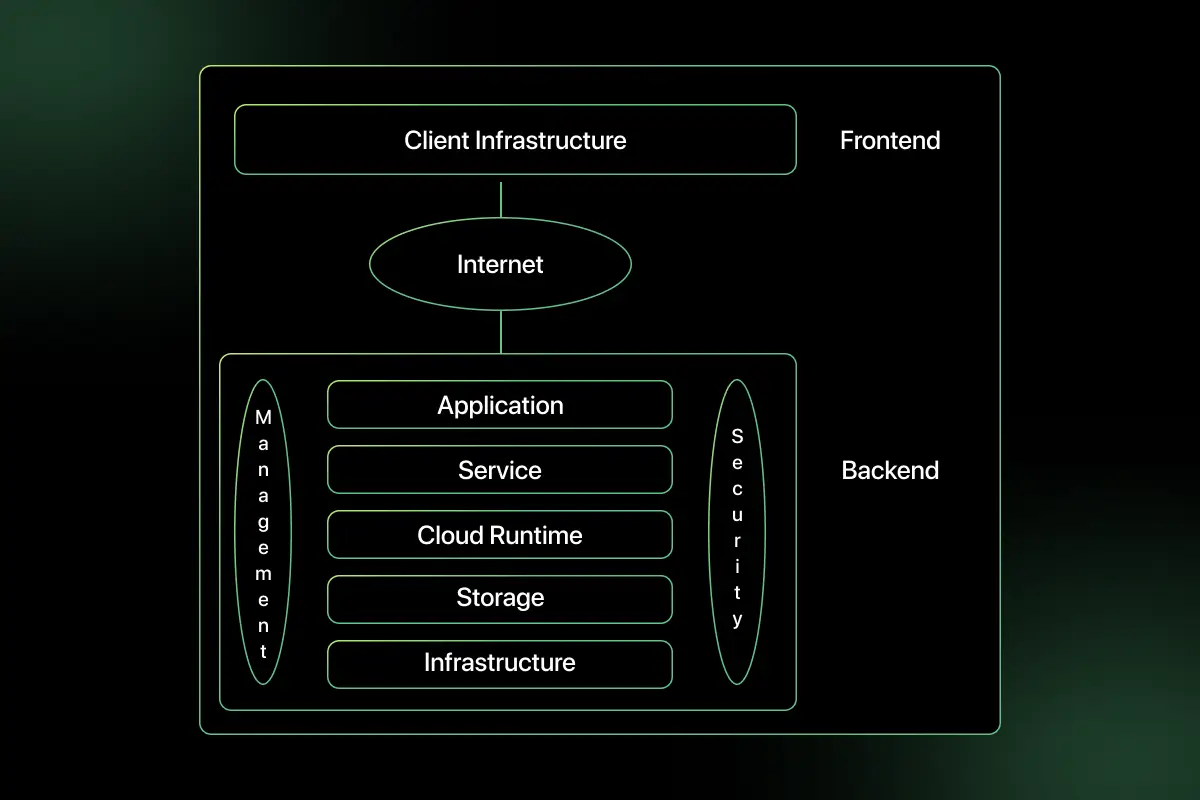
- Frontend and Backend Components: The architecture consists of a frontend that users interact with, such as web or mobile applications, and a backend that includes servers, storage systems, and management tools that process and store data.
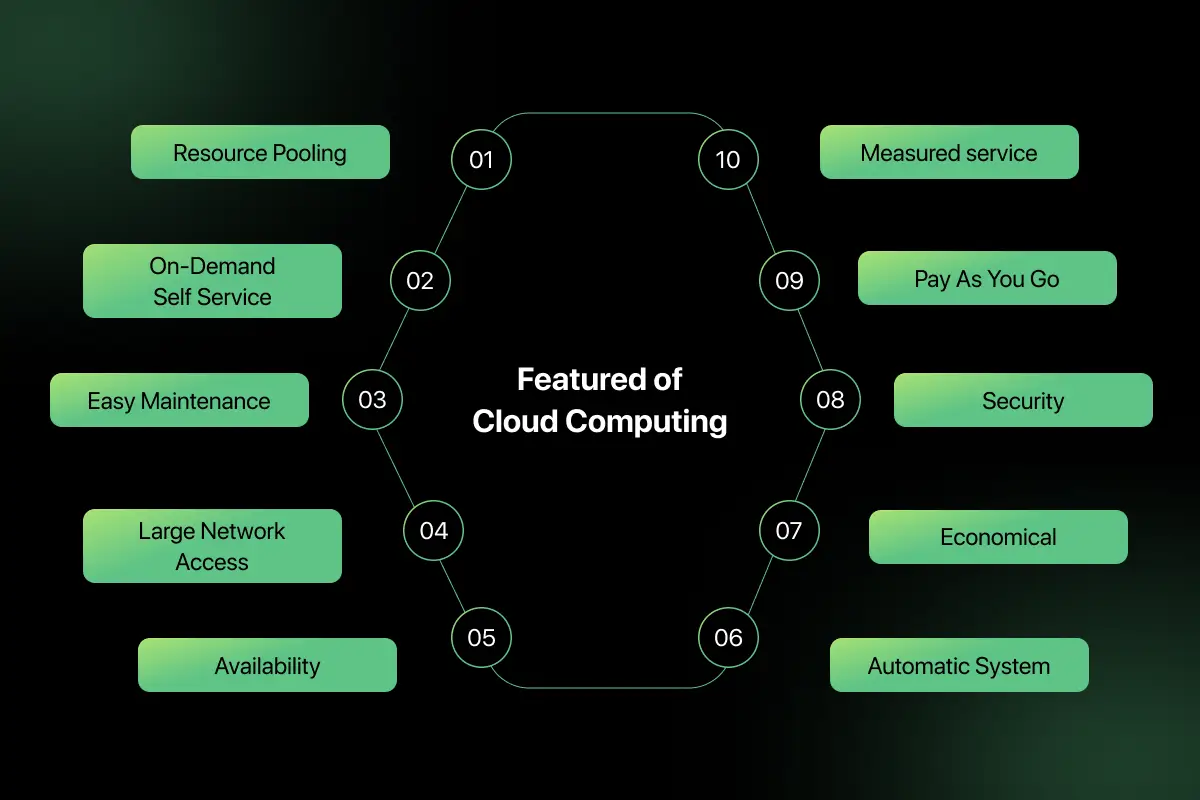
- Virtualization and Resource Pooling: Cloud architecture uses virtualization to create multiple virtual machines on physical hardware. Resource pooling allows multiple users to share computing resources securely and efficiently.
- On-Demand Service Delivery: Resources in cloud architecture are provided on demand. Users can access computing power, storage, or applications whenever needed without managing physical infrastructure.
Core Components of Cloud Computing Architecture
Cloud computing architecture consists of multiple interconnected components that work together to deliver scalable and reliable services.
- Frontend Platform: The frontend platform is the interface through which users access cloud services. It includes web browsers, mobile apps, or client applications that interact with cloud resources.
- Backend Infrastructure: The backend infrastructure includes physical servers, data centers, and computing resources that process requests and run applications. It handles data processing, resource allocation, and service management.
- Cloud Storage: Cloud storage is responsible for storing and managing data across distributed systems. It provides scalable and secure storage that users can access from anywhere.
- Virtualization Layer: The virtualization layer enables multiple virtual machines to run on a single physical server. It abstracts hardware resources and allows efficient resource sharing and isolation.
- Network and Internet: The network connects users to cloud services and enables communication between cloud components. It ensures data transfer, routing, and connectivity across distributed environments.
- Management and Security Layer: This layer monitors cloud resources, manages performance, and enforces security policies. It includes authentication systems, access control, and monitoring tools to maintain system reliability and protection.
Layers of Cloud Computing Architecture
Cloud computing architecture is organized into layers to separate responsibilities and simplify resource management. Each layer performs a specific function in delivering cloud services.
- Client Layer: The client layer represents the user interface. It includes web browsers, mobile applications, or thin clients that allow users to access cloud services and applications.
- Application Layer: The application layer delivers cloud-based software to users. It includes applications hosted in the cloud, such as email services, collaboration tools, and enterprise software.
- Platform Layer: The platform layer provides the environment for developing and deploying applications. It includes runtime environments, development tools, databases, and middleware services.
- Infrastructure Layer: The infrastructure layer offers virtualized computing resources such as virtual machines, storage, and networking. It supports scalability and flexible resource allocation.
- Server Layer: The server layer consists of the physical hardware and data centers that host the entire cloud system. It provides the foundation for virtualization and resource pooling.
Cloud Computing Architecture Diagram and Working Flow
This section explains how cloud computing architecture processes a typical user request using distributed and virtualized resources.
Scenario: A user uploads a file to a cloud storage platform.
- User request from device: The user selects a file and uploads it through a web browser or mobile application. The request is sent over the internet to the cloud provider.
- Request processed by cloud application: The cloud application receives the request, validates the user credentials, and prepares the file for storage.
- Virtual resources allocated: The cloud platform dynamically allocates virtual machines, storage blocks, and network bandwidth based on demand. This allocation happens automatically through the virtualization layer.
- Data stored in distributed storage: The file is stored across distributed storage systems within the cloud data center to ensure redundancy and high availability.
- Response returned: Once the upload is complete, a confirmation response is sent back to the user’s device. The file becomes accessible from any location with proper authentication.
Cloud Service Models in Architecture
Cloud computing architecture delivers services through different models based on the level of control and management provided to users.
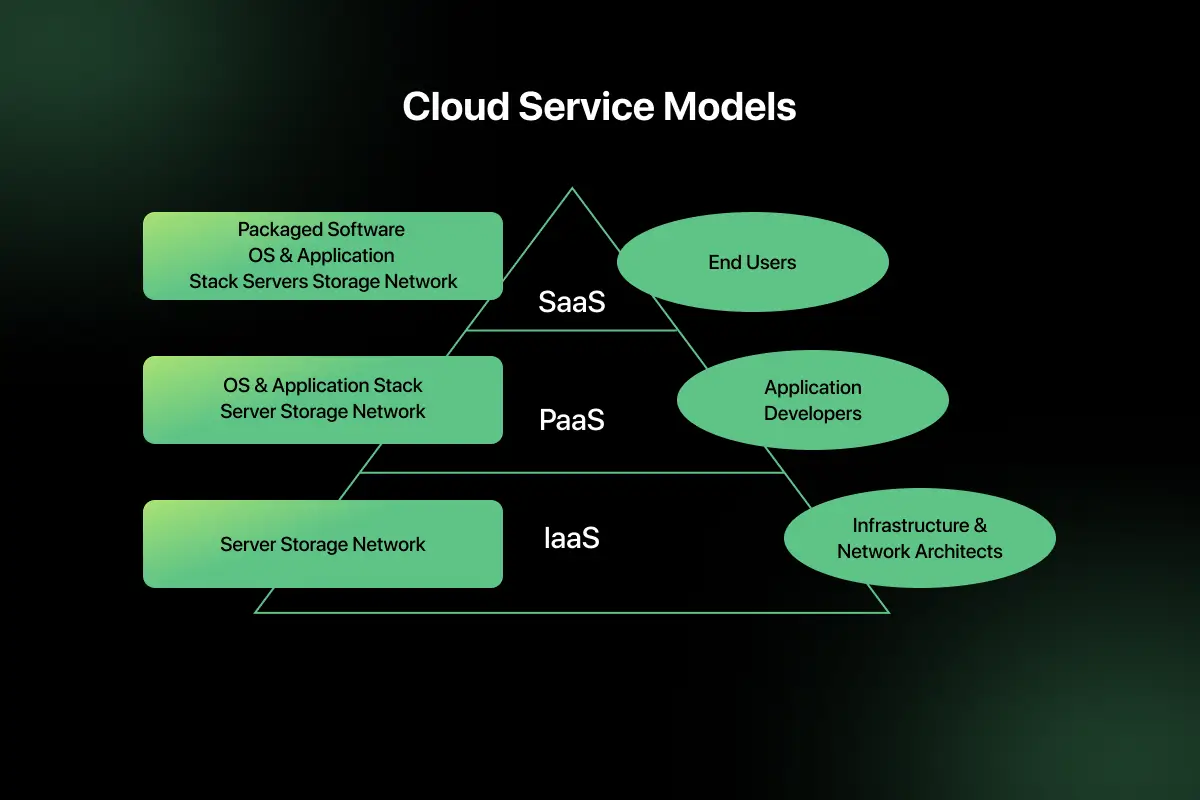
Infrastructure as a Service: Infrastructure as a Service provides virtualized computing resources such as virtual machines, storage, and networking. In the architecture, it forms the infrastructure layer where users manage operating systems and applications, while the cloud provider manages hardware.
Platform as a Service: Platform as a Service offers a development and deployment environment in the cloud. It includes runtime environments, databases, and development tools. In the architecture, it sits above the infrastructure layer and allows developers to build applications without managing underlying servers.
Software as a Service: Software as a Service delivers fully managed applications over the internet. Users access software through browsers without handling infrastructure or platforms. In the architecture, it represents the application layer where complete services are delivered directly to end users.
Cloud Deployment Models
Cloud computing architecture can be deployed in different models depending on ownership, access control, and organizational needs.
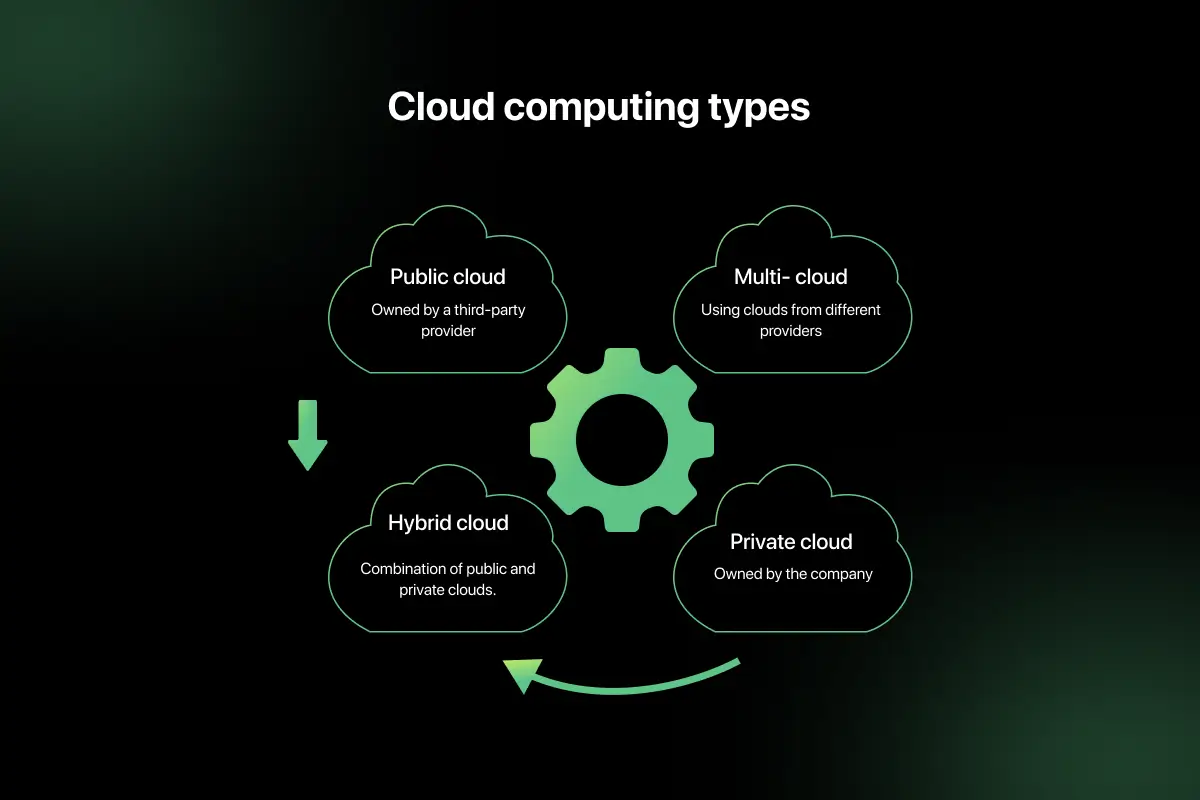
Public Cloud: Public cloud services are owned and managed by third-party providers. Resources are shared among multiple users and accessed over the internet. It offers high scalability and cost efficiency.
Private Cloud: A private cloud is dedicated to a single organization. It can be hosted internally or by a third party. This model provides greater control, customization, and security.
Hybrid Cloud: A hybrid cloud combines public and private cloud environments. Organizations can keep sensitive data in private infrastructure while using public cloud resources for scalability.
Community Cloud: Community cloud is shared by multiple organizations with similar security or regulatory requirements. It allows collaboration while maintaining controlled access and shared infrastructure.
Traditional IT Architecture vs Cloud Architecture
Understanding the difference between traditional IT architecture and cloud architecture helps organizations choose the right infrastructure model. The table below clearly compares both.
| Factor | Traditional IT Architecture | Cloud Architecture |
| Infrastructure Ownership | The organization owns and manages physical servers and data centers | Cloud provider owns and manages infrastructure |
| Scalability | Limited and requires hardware upgrades | Highly scalable through on-demand resource allocation |
| Cost Model | High upfront capital expenditure | Pay-as-you-use operational expenditure model |
| Maintenance | Organization responsible for hardware and software maintenance | Cloud provider handles infrastructure maintenance |
| Deployment Speed | Slow, requires hardware setup and configuration | Fast resources can be provisioned instantly |
| Resource Utilization | Often underutilized due to fixed capacity | Efficient utilization through resource pooling and virtualization |
Advantages and Challenges of Cloud Computing Architecture
Cloud computing architecture offers flexibility and scalability for modern applications, but it also introduces certain operational concerns that must be managed carefully.
Advantages
- On-demand scalability – Resources can be increased or decreased instantly based on workload requirements without purchasing additional hardware.
- Cost efficiency – Organizations pay only for the resources they use, reducing large upfront infrastructure investments.
- High availability – Cloud providers use distributed data centers and redundancy to ensure continuous service availability.
- Automatic updates – Infrastructure and platform updates are handled by the cloud provider, reducing maintenance effort.
- Global accessibility – Applications and data can be accessed securely from anywhere through the internet.
Challenges and Limitations
- Security concerns – Storing data on external servers may raise concerns about unauthorized access and cyber threats.
- Data privacy issues – Sensitive information must comply with regulations and data protection standards.
- Vendor lock in – Migrating applications between cloud providers can be complex and costly.
- Network dependency – Cloud services rely on stable internet connectivity for access and performance.
- Downtime risks – Although rare, service outages can impact availability if not properly managed.
Real World Use Cases
Cloud computing architecture is widely used in systems that require scalability, availability, and global access.
Cloud storage services: Cloud storage platforms store data across distributed servers. Cloud architecture ensures redundancy, automatic scaling, and secure access from any location.
Streaming platforms: Streaming services handle massive traffic and real-time content delivery. Cloud architecture supports elastic scaling and high bandwidth distribution during peak usage.
Enterprise SaaS applications: Business software delivered as a service relies on cloud infrastructure for centralized updates, multi-user access, and resource optimization.
Online collaboration tools: Collaboration platforms require continuous availability and real-time synchronization. Cloud architecture enables seamless data sharing and global accessibility.
Important Concepts to Remember
- Virtualization in the cloud
- Resource pooling
- Elasticity vs scalability
- Shared responsibility model
- Service vs deployment models
Final Words
Cloud computing architecture enables scalable and flexible resource management through virtualization and service models.
It supports modern applications with high availability and cost efficiency. Proper design ensures security and performance.
Explore More Architecture Blogs
- Database Management System
- Microservices
- Web Application
- REST API and API Gateway
- Distributed Systems
- OSI Security Model
- Docker
- Kubernetes
- SAP
- SQL Server
- Spring Boot
- Data Warehouse
- Java
- Linux
- Angular
- Selenium
FAQs
Cloud computing architecture is the structured design of cloud systems that defines how resources, services, and infrastructure are organized and delivered over the internet.
The main components include frontend interfaces, backend infrastructure, virtualization layer, cloud storage, networking systems, and management and security controls.
IaaS provides infrastructure resources, PaaS offers development platforms, and SaaS delivers fully managed software applications accessible through web interfaces.
Cloud deployment models include public, private, hybrid, and community clouds, each differing in ownership, accessibility, and infrastructure control.
Cloud architecture ensures scalability through virtualization, resource pooling, and dynamic allocation of computing resources based on workload demand.
Common challenges include security concerns, data privacy risks, vendor lock-in, network dependency, and occasional service downtime.



Aarthy is a passionate technical writer with diverse experience in web development, Web 3.0, AI, ML, and technical documentation. She has won over six national-level hackathons and blogathons. Additionally, she mentors students across communities, simplifying complex tech concepts for learners.



Aarthy is a passionate technical writer with diverse experience in web development, Web 3.0, AI, ML, and technical documentation. She has won over six national-level hackathons and blogathons. Additionally, she mentors students across communities, simplifying complex tech concepts for learners.
Related Posts
Difference between Main memory and Secondary memory
Have you ever noticed that unsaved work disappears after a power failure, while your documents, photos, and applications remain available …
Warning: Undefined variable $post_id in /var/www/wordpress/wp-content/themes/placementpreparation/template-parts/popup-zenlite.php on line 1050
so far feels like...
