Docker Architecture Explained
Modern applications are built using containers to ensure consistency across development, testing, and production environments. Managing dependencies and environment differences has always been a challenge in traditional deployment models.
Traditional virtual machines consume more resources and take longer to start. Containers provide a lightweight and efficient alternative.
Docker architecture defines how Docker uses images, containers, and a client-server model to build, ship, and run applications consistently across systems.
In this guide, you will understand Docker components, working flow, architecture diagram, and real-world use cases clearly and practically.
What is Docker Architecture?
Docker architecture is a client-server-based model that defines how Docker builds, manages, and runs containers using images and a container runtime environment.
- Structural Design of Docker Environment: It provides a structured framework for creating containerized applications. The architecture separates the client, Docker daemon, and container runtime to manage the application lifecycle efficiently.
- Client and Server Components: Docker follows a client-server model where the Docker client communicates with the Docker daemon to build images, create containers, and manage networks and volumes.
- Containerization and Resource Isolation: Docker uses containerization instead of full virtualization. Containers share the host operating system kernel while remaining isolated from each other.
- On-Demand Application Deployment: Applications can be packaged as images and deployed instantly as containers across different environments without configuration changes.
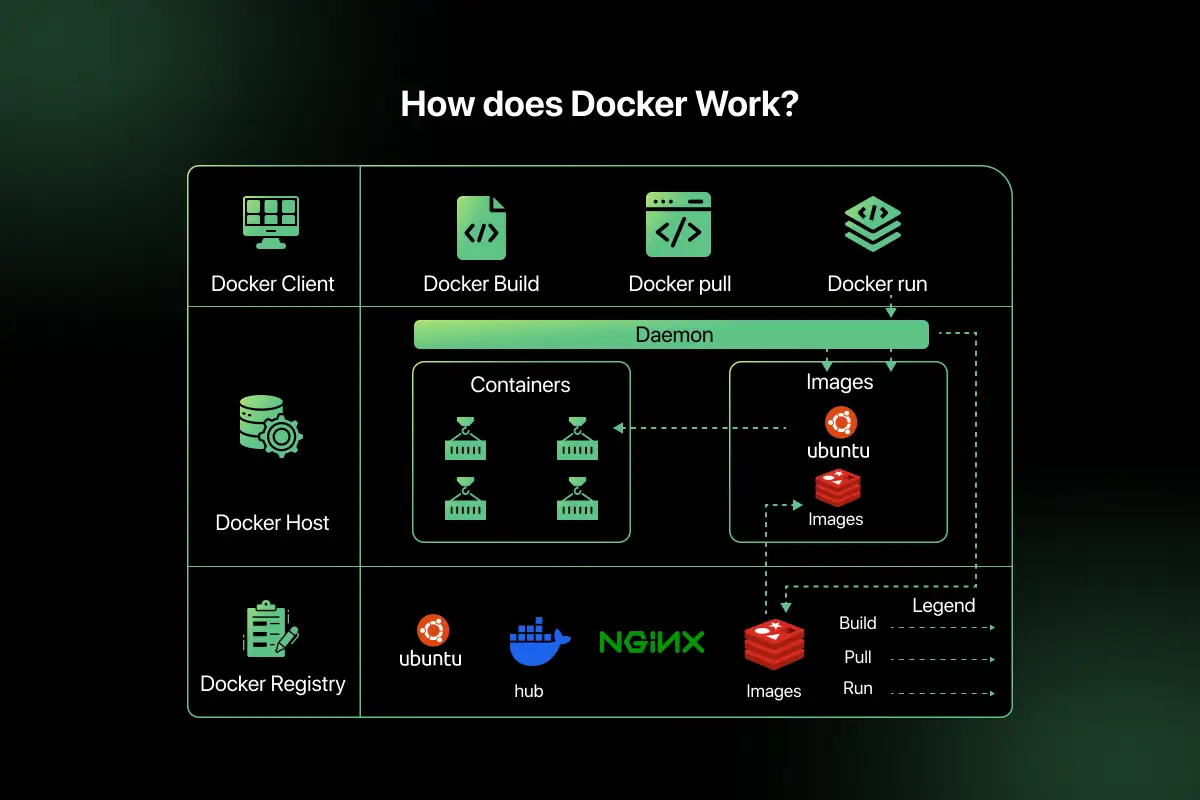
Overall Structure of Docker Architecture
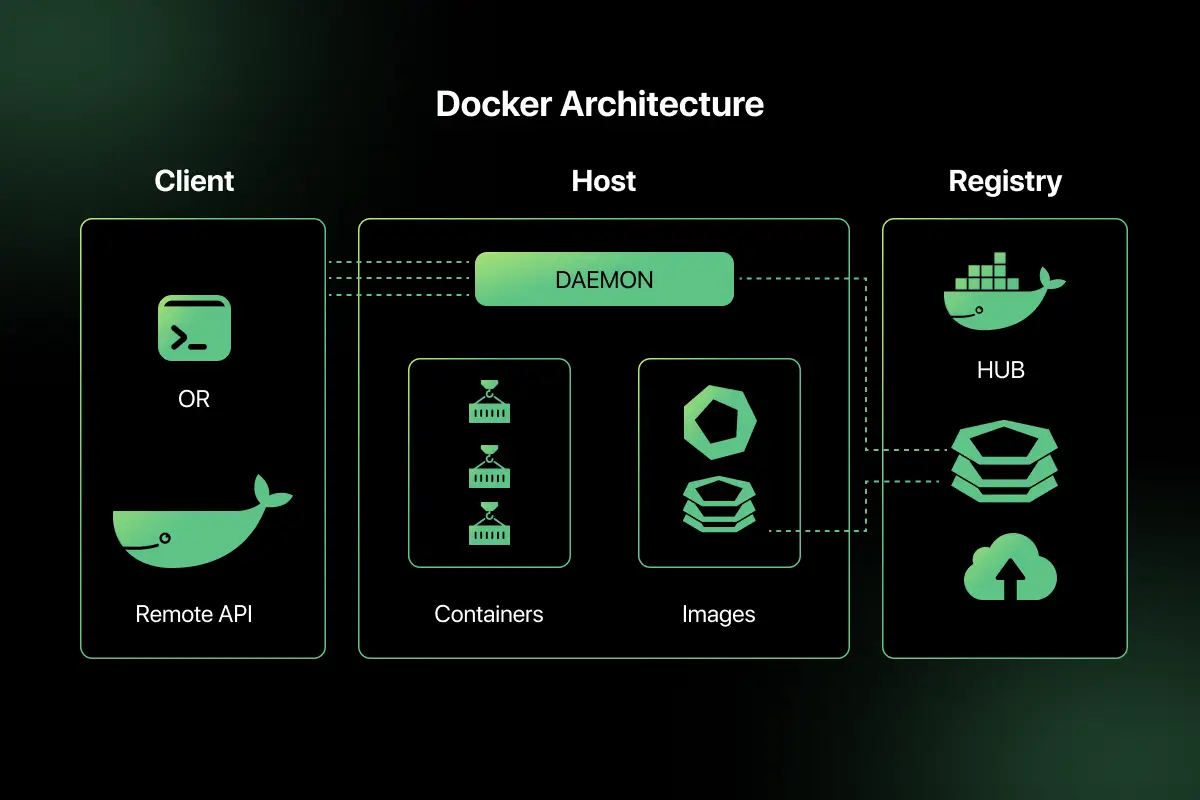
Docker architecture follows a client-server model. It is mainly divided into two key parts that work together to build and run containers.
- Docker Client: The Docker client is the interface through which users interact with Docker. It runs commands such as docker build, docker pull, and docker run. The client does not create containers directly. Instead, it sends requests to the Docker daemon.
- Docker Host: The Docker host is the system where containers actually run. It includes the Docker daemon, images, containers, networks, and storage. The host is responsible for building images, managing containers, and handling container lifecycle operations.
Interaction Between Docker Client and Docker Host
When a user runs a Docker command, the Docker client sends the request to the Docker daemon running on the Docker host. The daemon processes the request, pulls required images if necessary, and creates or manages containers accordingly.
Core Components of Docker Architecture
Docker architecture consists of several core components that work together to build, manage, and run containers efficiently.
- Docker Client: The Docker client is the command-line interface or API that users interact with. It sends commands and instructions to the Docker daemon for execution.
- Docker Daemon: The Docker daemon is the background service that runs on the Docker host. It listens for Docker API requests and manages images, containers, networks, and volumes.
- Docker Images: Docker images are read-only templates used to create containers. They contain application code, dependencies, libraries, and configuration needed to run an application.
- Docker Containers: Docker containers are running instances of Docker images. They provide isolated environments where applications execute independently while sharing the host operating system kernel.
- Docker Registry: A Docker registry is a storage location for Docker images. It allows users to push and pull images. Docker Hub is a commonly used public registry for sharing container images.
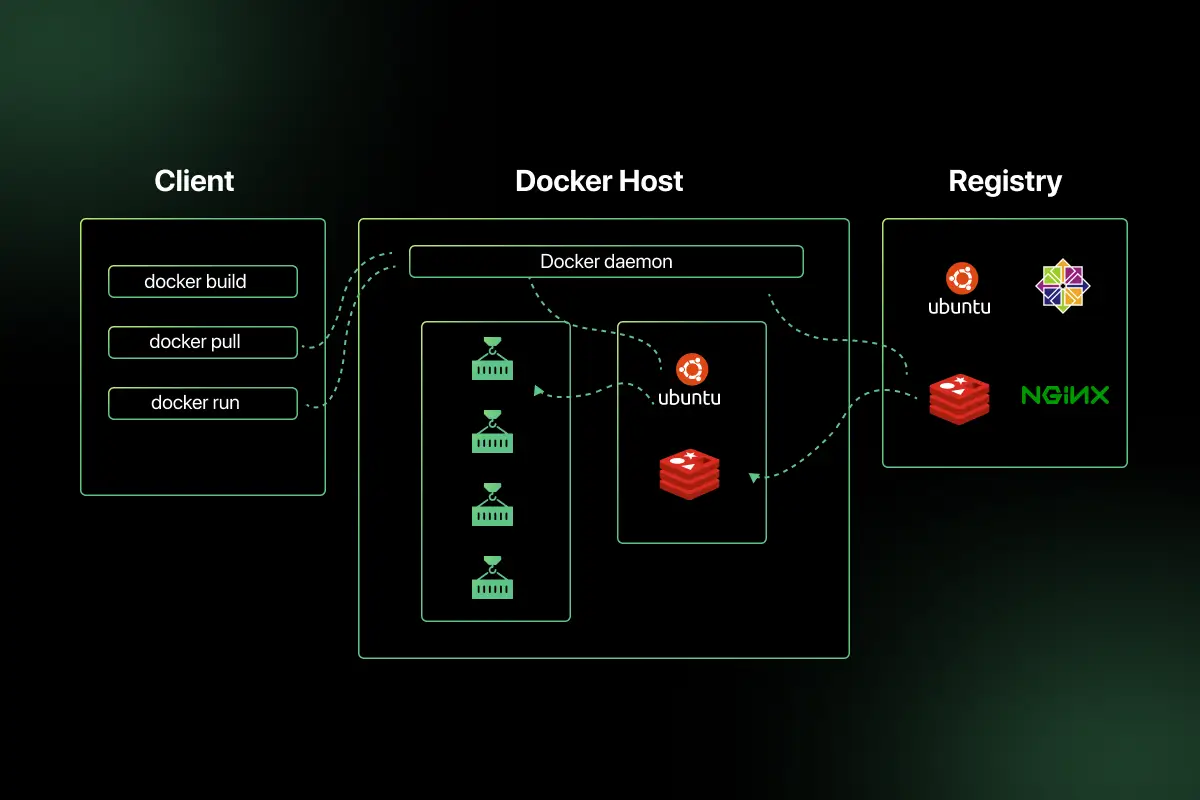
Docker Architecture Diagram and Working Flow
Learning Docker architecture involves understanding how containers, images, and the Docker engine work together to run applications in isolated environments.
This section explains how Docker architecture works when a container is created and executed.
Scenario: A developer runs an application inside a Docker container using a command.
- User runs Docker command: The user executes a command such as docker run nginx from the Docker client interface.
- Client sends request to daemon: The Docker client sends this request to the Docker daemon running on the Docker host.
- Daemon pulls image from registry: If the required image is not available locally, the daemon pulls it from a Docker registry such as Docker Hub.
- Container created: The daemon creates a container from the image, allocating required resources and setting up networking and storage.
- Application runs: The container starts executing the application inside an isolated environment while sharing the host operating system kernel.
Docker Networking and Storage
Docker provides built-in networking and storage mechanisms to enable communication between containers and persistent data management.
- Bridge Network: The bridge network is the default network in Docker. It allows containers running on the same host to communicate with each other using internal IP addresses while remaining isolated from external networks.
- Host Network: In the host network mode, a container shares the host system’s network stack. It does not get a separate IP address, which improves performance but reduces isolation.
- Volumes: Docker volumes are managed storage locations used to persist data outside the container lifecycle. Even if a container is removed, the data stored in volumes remains intact.
- Bind Mounts: Bind mounts link a directory or file from the host system directly into a container. This allows containers to access host files, but it depends on the host file structure.
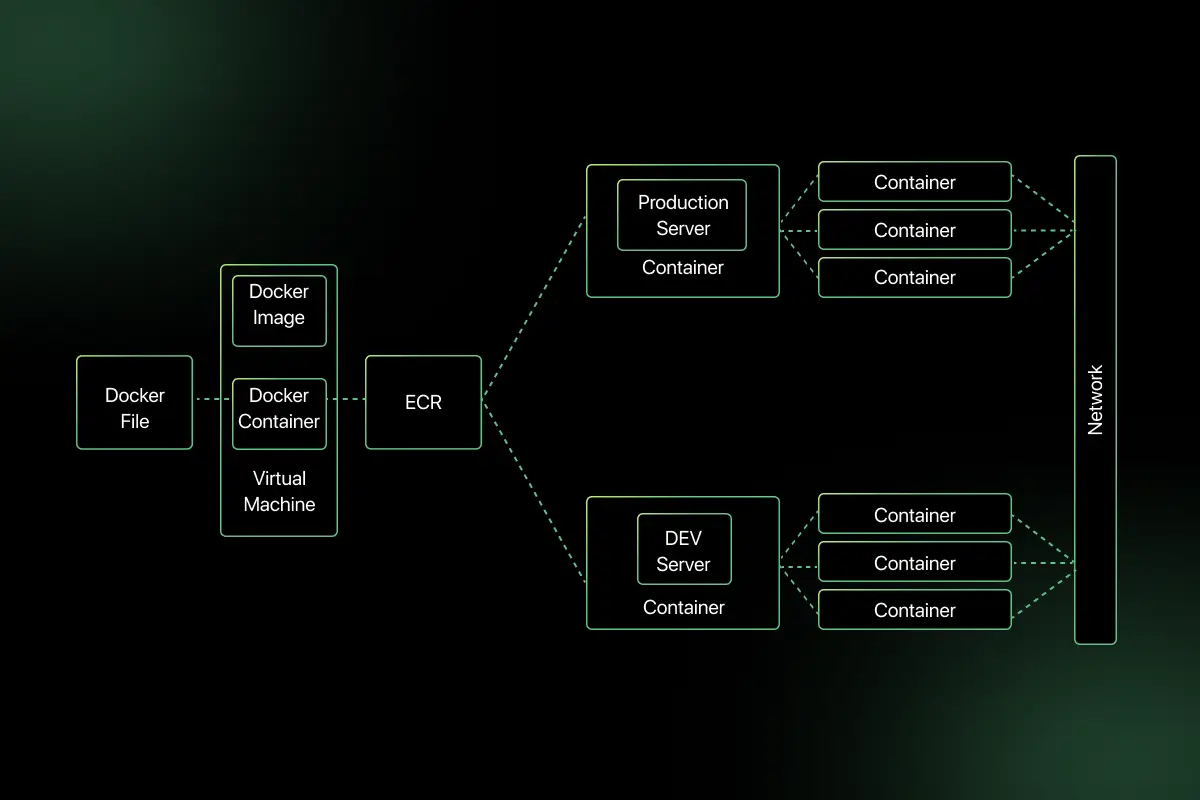
Docker vs Virtual Machine
Understanding the difference between Docker and Virtual Machines helps clarify why containerization is widely adopted in modern application deployment.
| Factor | Docker | Virtual Machine |
| Architecture | Uses container-based architecture, sharing the host OS kernel | Uses hypervisor based architecture with separate guest operating systems |
| Resource Usage | Lightweight and consumes fewer system resources | Resource-heavy due to a full operating system per VM |
| Startup Time | Starts in seconds | Takes minutes to boot |
| Isolation | Process-level isolation | Full hardware-level isolation |
| Performance | Near native performance due to shared kernel | Slightly slower due to virtualization overhead |
| Use Case | Microservices, CI CD pipelines, cloud native apps | Running multiple different operating systems on the same hardware |
Advantages and Challenges of Docker Architecture
Docker architecture offers efficiency and portability for modern application deployment, but it also introduces certain operational considerations.
Advantages
- Lightweight – Containers share the host operating system kernel, making them smaller and more resource-efficient than virtual machines.
- Fast deployment – Containers start within seconds, enabling quick application launches and rapid scaling.
- Portability – Docker images can run consistently across development, testing, and production environments without configuration changes.
- Efficient resource utilization – Multiple containers can run on the same host while consuming minimal system resources.
- Environment consistency – Docker ensures that applications run in the same environment across all stages, reducing dependency-related issues.
Challenges and Limitations
- Security concerns – Since containers share the host kernel, improper configuration can introduce security risks.
- Limited OS isolation – Containers do not provide full operating system-level isolation like virtual machines.
- Learning curve – Understanding Docker concepts such as images, containers, networking, and storage requires initial learning effort.
- Storage persistence management – Managing persistent data through volumes and bind mounts requires careful configuration to prevent data loss.

Real World Use Cases
Docker architecture is widely adopted in modern development and deployment environments because of its lightweight and portable nature.
Microservices deployment: Docker enables each microservice to run in its own container. This ensures isolation, independent scaling, and consistent deployment across environments.
CI CD pipelines: Containers are used in the build and testing stages to maintain consistent environments. This reduces errors caused by dependency differences during continuous integration and deployment.
Cloud native applications: Cloud native systems use Docker containers to package and deploy applications efficiently across cloud platforms with scalable resource allocation.
Dev and test environments: Developers use Docker to replicate production-like environments on local machines. This ensures consistent testing and reduces environment-related issues.
Important Concepts to Remember
- Docker daemon vs client
- Image vs container
- Docker registry
- Container runtime
- Dockerfile
If you want to test your understanding of containerization concepts, try solving Docker MCQ questions that cover container components, image management, and container runtime architecture.
These Docker interview questions for practice help reinforce concepts commonly asked in DevOps interviews and containerization discussions.
Final Words
Docker architecture enables lightweight containerization using a client daemon model. It simplifies application deployment and ensures environment consistency. Proper usage improves scalability and development speed.
Explore More Architecture Blogs
- Database Management System
- Microservices
- Web Application
- REST API and API Gateway
- Distributed Systems
- OSI Security Model
- Cloud Computing
- Kubernetes
- SAP
- SQL Server
- Spring Boot
- Data Warehouse
- Java
- Linux
- Angular
- Selenium
FAQs
Docker architecture is a client-server-based container platform that manages images, containers, networking, and storage for consistent application deployment across environments.
Core Docker components include Docker client, Docker daemon, Docker images, containers, and Docker registry, which together manage containerized applications.
Docker uses lightweight containers that share the host OS kernel, while virtual machines run separate operating systems with higher resource consumption.
A Docker image is a read-only template containing application code, dependencies, and configuration used to create and run containers.
The Docker daemon runs in the background, processes client requests, manages images and containers, and handles networking and storage operations.
Docker is used in microservices architecture, CI CD pipelines, cloud native applications, and development environments for consistent and scalable deployment.



Aarthy is a passionate technical writer with diverse experience in web development, Web 3.0, AI, ML, and technical documentation. She has won over six national-level hackathons and blogathons. Additionally, she mentors students across communities, simplifying complex tech concepts for learners.



Aarthy is a passionate technical writer with diverse experience in web development, Web 3.0, AI, ML, and technical documentation. She has won over six national-level hackathons and blogathons. Additionally, she mentors students across communities, simplifying complex tech concepts for learners.
Related Posts

Difference between Main memory and Secondary memory
Have you ever noticed that unsaved work disappears after a power failure, while your documents, photos, and applications remain available …

Warning: Undefined variable $post_id in /var/www/wordpress/wp-content/themes/placementpreparation/template-parts/popup-zenlite.php on line 1050
so far feels like...
