Linux Architecture Explained
Many people use Linux-based systems such as Ubuntu or Red Hat, but often wonder how the Linux operating system manages hardware, processes, and system resources efficiently. This capability comes from Linux architecture, which defines how different parts of the operating system work together.
Linux architecture organizes the operating system into multiple layers, including the kernel, system libraries, system utilities, and user applications. These layers work together to manage hardware resources and allow applications to run smoothly on the system.
In this article, we will explore what Linux architecture is, its main components, how it works, and how different layers interact within the Linux operating system.
What is Linux Architecture?
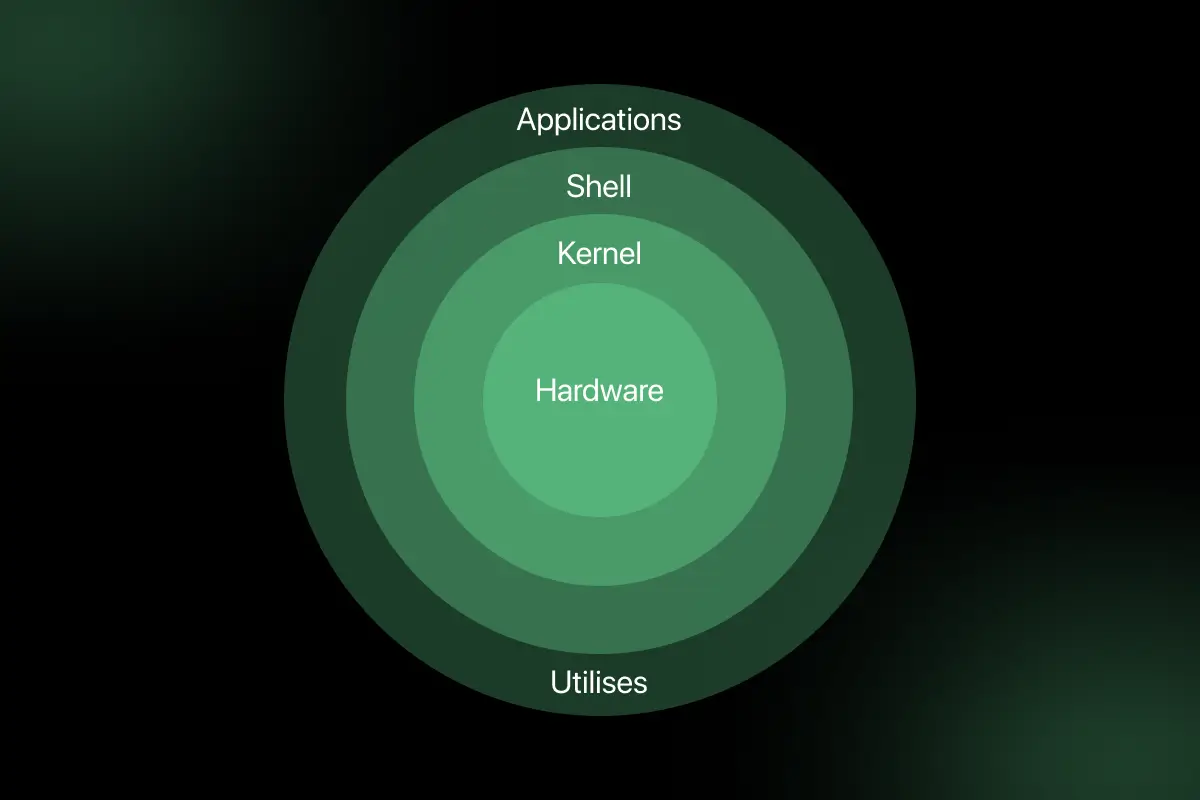
Linux architecture refers to the structural design of the Linux operating system that defines how hardware, system components, and user applications interact with each other. It explains how the operating system manages system resources, processes user requests, and allows applications to run efficiently on the hardware.
The Linux operating system architecture follows a layered structure that separates different system functions into organized components. The architecture of Linux typically includes the Linux kernel, system libraries, system utilities, and user applications, all working together to provide a stable and efficient operating environment.
Why Do We Need Linux Architecture?
A well-designed Linux architecture ensures efficient interaction between hardware devices, operating system components, and user applications.
It provides a structured framework that allows the operating system to manage system resources, execute processes, and maintain system stability.
The main purposes of Linux architecture include:
- Hardware Resource Management: Linux architecture helps manage system hardware such as the CPU, memory, storage devices, and input or output peripherals. The operating system allocates these resources efficiently so multiple applications can run smoothly.
- Process Management: The architecture of Linux allows the operating system to create, schedule, and manage multiple processes at the same time. This ensures that programs run efficiently without interfering with each other.
- Security and System Stability: Linux architecture includes security mechanisms that control user permissions and system access. This helps protect the system from unauthorized activities while maintaining stable operation.
- Efficient Communication Between Hardware and Applications: Linux architecture provides a structured communication layer between user applications and hardware components. This allows programs to interact with hardware through the operating system without directly accessing the physical devices.
Components of Linux Architecture
The Linux architecture components define how different parts of the operating system work together to manage hardware resources and run applications. Each component performs a specific role in ensuring that the system operates efficiently, securely, and reliably.
1. Hardware Layer
The hardware layer forms the foundation of the Linux system and includes all the physical components of the computer. These components provide the computing resources required to run the operating system and applications.
Examples of hardware components include:
- CPU (Central Processing Unit) for executing instructions
- Memory (RAM) for storing active programs and data
- Storage devices such as hard drives and SSDs
- Input and output devices such as keyboards, monitors, and network interfaces
The Linux operating system interacts with these devices through the kernel and device drivers.
2. Linux Kernel
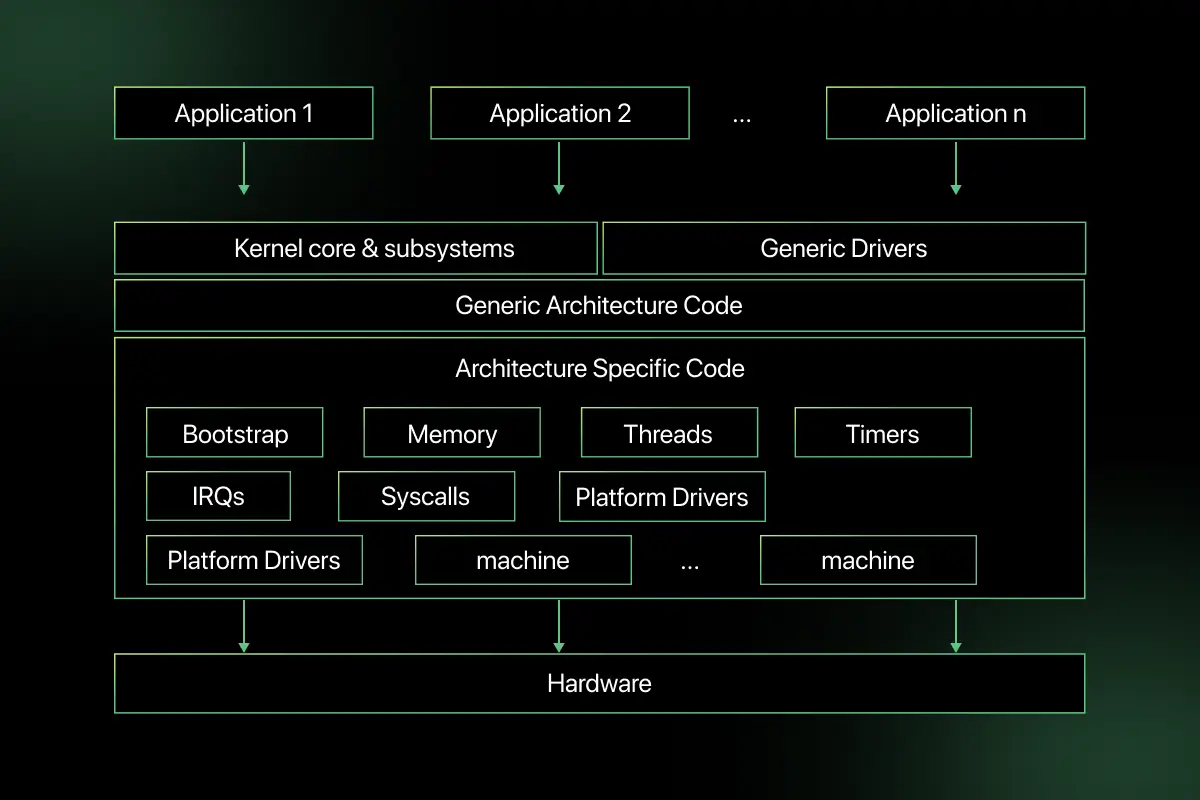
The Linux kernel is the core component of the operating system and acts as a bridge between hardware and user applications. It is responsible for controlling system resources and managing communication between software and hardware.
Some key functions of the Linux kernel include:
- Process management – creating, scheduling, and terminating processes
- Memory management – allocating and managing system memory for programs
- Device drivers – enabling communication between hardware devices and the operating system
- File system management – organizing and controlling access to files stored on storage devices
The kernel plays a critical role in ensuring that the system operates efficiently and securely.
3. System Libraries
System libraries provide standard functions and APIs that allow applications to interact with the Linux kernel without directly accessing hardware. These libraries act as an interface between application programs and the operating system.
By using system libraries, developers can build applications that rely on predefined functions for tasks such as file operations, memory allocation, and process control.
4. System Utilities
System utilities are programs and command-line tools that help users manage and control the Linux system. They perform administrative tasks and support system operations.
Examples of system utilities include tools for file management, process monitoring, system configuration, and package management. These utilities help administrators maintain and manage the system effectively.
5. User Applications
User applications are the programs that run on top of the Linux operating system and provide functionality to end users. These applications rely on system libraries and the kernel to perform tasks and access system resources.
Examples of user applications include:
- text editors
- web browsers
- development tools
- database systems
- media applications
These applications represent the top layer of the Linux architecture and interact with the operating system to perform various tasks.
Linux Architecture Diagram and Working Flow
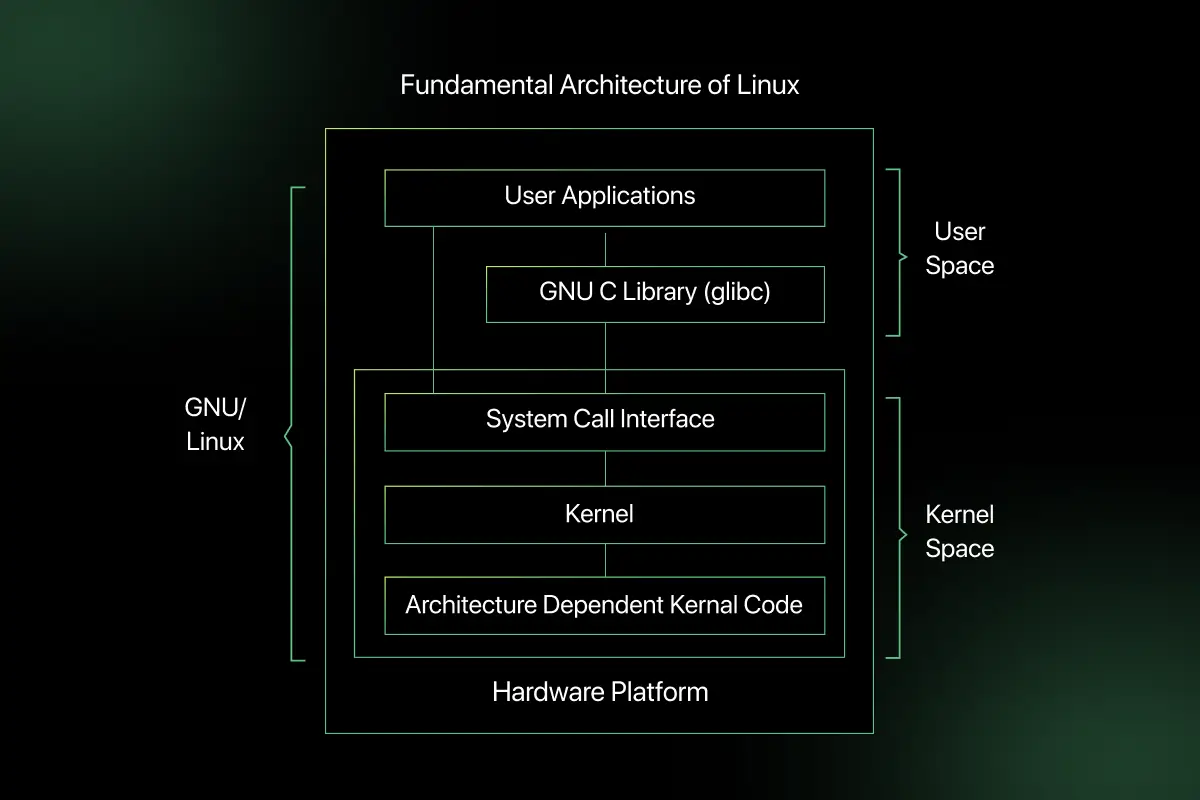
Learning Linux architecture involves understanding a layered approach where each layer performs a specific function before passing control to the next layer.
- Step 1: User Applications Send Requests: The process begins when a user interacts with an application such as a text editor, browser, or terminal. These applications generate requests when the user performs actions like opening a file, running a command, or accessing the network.
- Step 2: System Libraries Process the Requests: The request is passed to the system libraries, which provide standard functions and APIs for interacting with the operating system. These libraries act as a bridge between user applications and the Linux kernel, simplifying communication with lower system layers.
- Step 3: The Linux Kernel Receives and Manages the Request: Once the request reaches the kernel, it decides how the required system resources should be allocated. The kernel handles tasks such as process scheduling, memory allocation, file access, and communication with device drivers.
- Step 4: Kernel Communicates with Hardware Through Device Drivers: The kernel uses device drivers to send instructions to the appropriate hardware components. These drivers allow the operating system to interact with devices such as storage disks, printers, network cards, and display units in a controlled way.
- Step 5: Hardware Executes the Operation and Sends Results Back: After receiving the instruction, the hardware performs the required task, such as reading data, displaying output, or processing input. The result is then passed back through the kernel and system libraries to the user application, where it is finally shown to the user.
Kernel Space vs User Space
Linux architecture separates operations into kernel space and user space to maintain system security, stability, and efficient resource management.
Kernel space handles critical system functions, while the user space is where applications and user programs run.
| Layer | Role | Access Level | Examples |
| Kernel Space | Manages core operating system functions such as process scheduling, memory management, and device communication | Full access to hardware and system resources | Linux Kernel, device drivers, process scheduler, memory manager |
| User Space | Runs user applications and programs that interact with the operating system through system libraries | Limited access; cannot directly interact with hardware | Web browsers, text editors, command-line tools, and user applications |
Advantages and Limitations of Linux Architecture
The design of Linux architecture offers several benefits that make it widely used in servers, cloud systems, and enterprise environments. However, it also has a few limitations that users and organizations should consider.
Advantages
- Open Source Flexibility: Linux architecture is open source, allowing developers to modify and customize the operating system according to their requirements.
- Strong Security: Built-in security mechanisms such as user permissions and access controls help protect systems from unauthorized access.
- Efficient Resource Management: Linux architecture efficiently manages system resources like CPU, memory, and storage, allowing multiple processes to run smoothly.
- Stability and Reliability: Linux systems are known for their stability and can run for long periods without crashes or performance issues.
Limitations
- Learning Curve for Beginners: New users may find Linux difficult to learn initially because many tasks require command-line usage.
- Limited Support for Some Proprietary Software: Certain commercial applications are designed mainly for other operating systems and may not have direct Linux versions.
- Hardware Compatibility Issues: In some cases, specific hardware devices may not have full driver support for Linux, which can cause compatibility issues.

Real World Use Cases of Linux Architecture
Linux is widely used across industries because its architecture provides stability, security, and efficient resource management. Its layered design allows organizations to build reliable systems that can handle large-scale workloads.
Web Servers: Many websites and web applications run on Linux servers because the operating system provides high performance and strong security. Technologies like Apache and Nginx commonly operate on Linux-based systems.
Cloud Infrastructure: Most cloud platforms use Linux to manage virtual machines and distributed computing environments. Linux architecture helps cloud providers efficiently handle large numbers of users and applications.
Supercomputers: A large number of the world’s supercomputers run on Linux due to its flexibility and performance. Linux architecture allows researchers and organizations to process massive datasets and perform complex scientific computations.
Embedded Systems: Linux is also used in embedded devices such as smart TVs, routers, and automotive systems. Its architecture allows developers to customize the operating system to run efficiently on specialized hardware.
Linux Kernel vs Linux OS vs Distribution
Many beginners often confuse the Linux kernel, Linux operating system, and Linux distributions because these terms are closely related but represent different parts of the Linux ecosystem.
Understanding the difference helps clarify how Linux architecture is structured and used in real systems.
| Component | Description | Role in the System | Examples |
| Linux Kernel | The core part of the Linux system responsible for interacting directly with hardware | Manages processes, memory, device drivers, and system resources | The Linux Kernel developed by the Linux community |
| Linux Operating System | The complete system is built around the Linux kernel with system libraries and utilities | Provides the environment required to run applications and manage system operations | Linux OS environment with kernel, libraries, and system tools |
| Linux Distributions | Packaged versions of the Linux operating system that include the kernel, tools, and additional software | Provide ready-to-use operating systems designed for different users and purposes | Ubuntu, Fedora, Debian, Red Hat |
Important Concepts and Interview Questions
- Explain Linux architecture.
- What are the layers of Linux architecture?
- What is the role of the Linux kernel?
- What is the difference between kernel space and user space?
If you want to test your understanding of Linux architecture concepts, try solving Linux MCQ questions that cover kernel components, process management, and system resource handling.
These Linux interview questions for practice help reinforce concepts commonly asked in system programming and technical interview discussions.
Final Words
Linux architecture provides a structured and efficient way to manage hardware resources and run applications through its layered design. By separating components such as the kernel, system libraries, utilities, and user applications, the Linux operating system ensures stability, security, and efficient system performance.
Understanding Linux architecture helps users and developers see how commands move through the system and how the operating system manages processes, memory, and hardware interaction effectively.
Explore More Architecture Blogs
- Database Management System
- Microservices
- Web Application
- REST API and API Gateway
- Distributed Systems
- OSI Security Model
- Cloud Computing
- Docker
- Kubernetes
- SAP
- SQL Server
- Spring Boot
- Data Warehouse
- Java
- Angular
- Selenium
FAQs
Linux architecture is the structural design of the Linux operating system that defines how hardware, kernel, system libraries, and user applications interact.
Linux architecture includes hardware, the Linux kernel, system libraries, system utilities, and user applications working together to manage system resources and run programs.
The Linux kernel manages system resources such as CPU, memory, devices, and processes while acting as a bridge between hardware and user applications.
The main layers include hardware, Linux kernel, system libraries, system utilities, and user applications that together support system operations and program execution.
Kernel space manages core system functions with full hardware access, while user space runs applications with limited permissions for security and stability.
A Linux architecture diagram shows how user applications, system libraries, the kernel, and hardware interact to process commands and manage system resources.
Linux architecture separates system components, uses strong permission controls, and isolates processes, helping maintain system stability and security.
Linux architecture is widely used in web servers, cloud platforms, supercomputers, embedded systems, and enterprise infrastructure.



Aarthy is a passionate technical writer with diverse experience in web development, Web 3.0, AI, ML, and technical documentation. She has won over six national-level hackathons and blogathons. Additionally, she mentors students across communities, simplifying complex tech concepts for learners.



Aarthy is a passionate technical writer with diverse experience in web development, Web 3.0, AI, ML, and technical documentation. She has won over six national-level hackathons and blogathons. Additionally, she mentors students across communities, simplifying complex tech concepts for learners.
Related Posts
Difference between Main memory and Secondary memory
Have you ever noticed that unsaved work disappears after a power failure, while your documents, photos, and applications remain available …
Warning: Undefined variable $post_id in /var/www/wordpress/wp-content/themes/placementpreparation/template-parts/popup-zenlite.php on line 1050
so far feels like...
